library(tidyverse)  # Standard packages for data transformation
library(flextable)  # For printing nice tables in Quarto

hotels <- read_csv("data/hotels-vienna.csv")Post-Session Companion
A closer look at the code of the live demo
Purpose of this document
This document is meant to answer several questions that emerged after the live coding, and about some of the decisions made along the way:
- Why so much
round(), when Step 4 warns against it? And when doesfactor()come in? - When do we use the median, and when the mean?
- Should a number from a table that I mention in my text also be inline R code? And why does that give me an error?
- What does
if_else()do, and why is it used where it is?
There is a bigger question behind all four. Students have mentioned that in Statistik I and II the data mostly arrived ready to analyse: someone had already decided what counts as a category, which rows belong in the sample and what each variable means. Here — as in any real-world application — those decisions are yours, and they are part of the analysis. Every one of them has implications for the result, and every one of them is something you should be able to defend in a report.
1 Bridging to Statistik I and II
Most of what happened in session 2 is not new. It is what you did in Statistik I and II, written differently — and with the preparation no longer done for you.
| In Statistik I/II you met… | In session 2 it appeared as… | What is different now |
|---|---|---|
| Levels of measurement (Skalenniveaus): nominal, ordinal, metric | turning stars into the factor star_tier (Step 4) |
You decide the level — and have to tell R |
| Measures of central tendency (Lagemaße), skewness, outliers | median(price) throughout (Step 5 onwards) |
You choose the measure, and justify it |
| Cross tables, conditional relative frequencies (Zeilen- vs. Spaltenprozente) | star_mix_centre, “read downwards” (Step 9) |
You build the table, so you decide which way it sums to one |
| The weighted arithmetic mean | the three averages (Step 9) | The weights are the thing we deliberately swap |
| Third variables (Drittvariablen), spurious correlation | location versus star rating (Steps 6–9) | Nobody tells you which third variable to look for |
| Dummy variables | if_else() in the exemplary solution; shares as mean() of TRUE/FALSE (Step 6) |
You create them yourself |
| Multiple regression, “holding other variables constant” | Step 11: so why not just run a regression? | We do by hand what a regression does, to watch it happen |
| Sample size and standard errors | always print n (Steps 8 and 9) |
No test warns you — you have to look |
NoteThis table is my reading — tell me where it is wrong
I put this table together from what I know about Statistik I and II — from the official descriptions and statements from the instructor. Your course may have used different names, a different order, or skipped some of it altogether. If something here does not match what you did, please tell me — in the session or by mail. That is exactly the information I need to build better bridges, for you and for the next cohort.
2 Where we pick up
The cleaning from Steps 2 and 4, in one block, so this document runs on its own:
hotels_clean <- hotels |>
  filter(city_actual == "Vienna", price < 1000) |>
  mutate(
    band = cut(distance, breaks = c(-0.1, 1, 2, 3, 100),
               labels = c("<1 km", "1-2 km", "2-3 km", ">3 km")),
    star_tier = factor(floor(stars + 0.5), levels = 1:5,
                       labels = paste(1:5, "stars"))
  )

only_hotels <- hotels_clean |>
  filter(accommodation_type == "Hotel")
3 Steps 9 to 11, in more detail
3.1 What Step 9 is for
By Step 6 we had a number: among hotels, the centre charges a median of €134 and the ring one to two kilometres out €85.50 — a gap of €48.50. And we had a suspicion: the centre also holds more four- and five-star hotels.
In the language of Statistik, star rating is a third variable. It is related to location (fancy hotels are central) and to price (fancy hotels are expensive). So the raw gap mixes two things:
- Location: the same kind of hotel charges more in the centre.
- Composition: the centre holds more of the expensive kinds of hotel.
Step 7 looked at one star tier at a time. Step 9 puts the pieces back together and asks: how much of the gap is which?
3.2 The whole idea with made-up numbers
Before any R, here is the full logic on numbers small enough to do in your head. Imagine a city with only two kinds of hotel:
| Centre: share | Centre: price | Outer ring: share | Outer ring: price | |
|---|---|---|---|---|
| 3 stars | 40% | €100 | 70% | €90 |
| 4 stars | 60% | €160 | 30% | €120 |
The average price in each band is a weighted mean, exactly as in Statistik I: each price, weighted by how common it is in that band.
- Centre: 0.4 × 100 + 0.6 × 160 = €136
- Outer ring: 0.7 × 90 + 0.3 × 120 = €99
A gap of €37. Now the what-if: keep the centre’s prices, but give it the outer ring’s mix of hotels.
- Centre prices, outer mix: 0.7 × 100 + 0.3 × 160 = €118
And the gap falls apart into two pieces:
- €136 → €118: only the mix changed. That is €18 of composition.
- €118 → €99: only the prices changed. That is €19 of location.
- €18 + €19 = €37. Nothing is lost and nothing is double-counted.
That is all Step 9 does. Everything else in it is getting the real data into the shape this calculation needs.
Here is the same toy example in R, with exactly the column names and exactly the code Step 9 uses:
toy <- tribble(
  ~star_tier, ~n_centre, ~m_centre, ~n_outer, ~m_outer,
  "3 stars",  20,        100,       35,        90,
  "4 stars",  30,        160,       15,       120
) |>
  mutate(
    star_mix_centre = n_centre / sum(n_centre),
    star_mix_outer  = n_outer  / sum(n_outer)
  )

toy |>
  summarise(
    centre_as_is     = sum(star_mix_centre * m_centre),
    centre_outer_mix = sum(star_mix_outer  * m_centre),
    outside          = sum(star_mix_outer  * m_outer)
  ) |>
  ft()
centre_as_is | centre_outer_mix | outside |
|---|---|---|
136 | 118 | 99 |
Same three numbers as on paper. If you can follow the toy example, you can follow Step 9.
TipA habit I recommend: test code on data where you know the answer
When a block of code confuses you, do what we just did. Build a tiny table with tribble() — two or three rows, round numbers — work out on paper what the result should be, and run the code on it. If R agrees with your paper, you understand the code. If it does not, you have found either a bug or a gap in your understanding, and both are worth finding.
3.3 The same four moves on the real data
3.3.1 Move 1: one row per tier and band
tiers <- only_hotels |>
  filter(band %in% c("<1 km", "1-2 km")) |>
  group_by(band, star_tier) |>
  summarise(n = n(), median_price = median(price), .groups = "drop")

tiers |> ft()
band | star_tier | n | median_price |
|---|---|---|---|
<1 km | 1 stars | 1 | 81.0 |
<1 km | 2 stars | 7 | 75.0 |
<1 km | 3 stars | 31 | 98.0 |
<1 km | 4 stars | 63 | 138.0 |
<1 km | 5 stars | 25 | 252.0 |
1-2 km | 2 stars | 5 | 56.0 |
1-2 km | 3 stars | 30 | 82.0 |
1-2 km | 4 stars | 39 | 95.0 |
1-2 km | 5 stars | 2 | 113.5 |
Grouping by two variables gives one row per combination. This is a cross table from Statistik, written in long form: instead of a grid with bands as columns, every cell of the grid gets its own row.
3.3.2 Move 2: put the two bands side by side
R calculates along rows. To compare the central price of a tier with its outer price, both numbers have to sit in the same row. So we split the table by band and glue the halves back together on star_tier:
centre <- tiers |>
  filter(band == "<1 km") |>
  select(star_tier, n_centre = n, m_centre = median_price)

outer <- tiers |>
  filter(band == "1-2 km") |>
  select(star_tier, n_outer = n, m_outer = median_price)
select(star_tier, n_centre = n) keeps the column n but renames it, so the two halves do not both carry a column called n. left_join() then matches rows where star_tier agrees. The one-star tier exists only in the centre, so its outer columns come back as NA — and a tier without a comparison cannot tell us anything about a difference, so filter(!is.na(m_outer)) drops it.
3.3.3 Move 3: the star mix of each band
comparison <- centre |>
  left_join(outer, by = "star_tier") |>
  filter(!is.na(m_outer)) |>
  mutate(
    star_mix_centre = n_centre / sum(n_centre),
    star_mix_outer  = n_outer  / sum(n_outer)
  )

comparison |>
  mutate(                                   # rounded for READING only
    star_mix_centre = round(star_mix_centre, 2),
    star_mix_outer  = round(star_mix_outer,  2)
  ) |>
  ft()
star_tier | n_centre | m_centre | n_outer | m_outer | star_mix_centre | star_mix_outer |
|---|---|---|---|---|---|---|
2 stars | 7 | 75 | 5 | 56.0 | 0.06 | 0.07 |
3 stars | 31 | 98 | 30 | 82.0 | 0.25 | 0.39 |
4 stars | 63 | 138 | 39 | 95.0 | 0.50 | 0.51 |
5 stars | 25 | 252 | 2 | 113.5 | 0.20 | 0.03 |
n_centre / sum(n_centre) is a conditional relative frequency: the share of a tier among the central hotels. In a Statistik cross table these would be the column percentages — each band adds up to 100% on its own. That is why the live coding insists on reading the two columns downwards.
The two columns describe two differently built markets: five-star hotels are 20% of the centre, but only 3% of the ring outside. Three-star hotels are 25% of the centre and 39% outside. This is the toy table from above, with real numbers in it.
3.3.4 Move 4: the three averages, and the split
averages <- comparison |>
  summarise(
    centre_as_is     = sum(star_mix_centre * m_centre),
    centre_outer_mix = sum(star_mix_outer  * m_centre),
    outside          = sum(star_mix_outer  * m_outer)
  )

gap_split <- averages |>
  mutate(
    total       = centre_as_is     - outside,
    composition = centre_as_is     - centre_outer_mix,
    location    = centre_outer_mix - outside
  )

gap_split |> round(2) |> ft()
centre_as_is | centre_outer_mix | outside | total | composition | location |
|---|---|---|---|---|---|
147.28 | 121.07 | 87.79 | 59.49 | 26.21 | 33.28 |
Exactly the recipe from the toy example:
| Whose prices? | Whose star mix? | Toy example | Real data | |
|---|---|---|---|---|
centre_as_is |
centre | centre | €136 | €147.28 |
centre_outer_mix |
centre | outer ring | €118 | €121.07 |
outside |
outer ring | outer ring | €99 | €87.79 |
Of the €59.49 gap, €26.21 is composition and €33.28 is location — so roughly 44% of the gap is the centre simply holding fancier hotels.
NoteGoing further: the order of the what-if matters
We asked: what if the centre had the outer ring’s mix? We could just as well have asked: what if the outer ring had the centre’s mix? — outer prices, central composition. Both are legitimate. They do not give the same answer.
In the toy example: outer prices with the central mix are 0.4 × 90 + 0.6 × 120 = €108. Then the split is €136 → €108 = €28 location and €108 → €99 = €9 composition — instead of €19 and €18.
other_way <- comparison |>
  summarise(outer_centre_mix = sum(star_mix_centre * m_outer))
On the real data, outer prices with the central mix come to €93.31. That makes composition €5.52 instead of €26.21, or 9% of the gap instead of 44%.
This is a well-known property of decompositions like this one, not a mistake in the code. Both orders agree on the direction — composition matters, and so does location — and disagree on the size. Which brings us to the end of Step 9.
3.4 Why we then distrust our own result
The five-star row has the biggest price difference in the whole table, and it rests on 2 hotels outside the centre. A median of 2 values is simply the average of those 2 buildings. If one of them were renovated next year, the row would change completely.
So the live coding re-runs the identical calculation without that row. The composition share drops from 44% to 11%. In Statistik terms: the composition share has a huge standard error. We cannot compute the standard error with the tools of this session, but we can see it — by checking how much the answer moves when a handful of observations leave.
That is the general move, and it works in any report: if a result rests on a few observations, run it again without them, and report whether it survives.
3.5 Step 10 in one paragraph
A pipeline’s result is just another data frame, and ggplot() takes data frames. So the chart in Step 10 is built in two parts: a pipeline that produces exactly the numbers to be plotted (plot_data), and ggplot() code that only draws them. Most of the ggplot() code is presentation — the callout in the live coding explains each line, and sessions 5 and 6 do it properly. The one technical detail is .groups = "drop": after grouping by two variables, summarise() leaves the result still grouped by the first one, which can quietly change what later steps do. Dropping the grouping is a good habit.
3.6 Step 11: what we can claim
Here is the statement we can defend: the centre is expensive for both reasons — it holds fancier hotels, and the same kind of hotel charges more there. For three- and four-star hotels we can put a size on the location premium; for five-star hotels we cannot, and for the split between the two reasons we can report the direction but not the share.
This is where Statistik II comes back. A multiple regression of price on distance and star tier reports the distance effect “holding star tier constant” — which is what Steps 7 to 9 did by hand. It does so with all hotels at once, and it attaches a standard error to the answer, which is exactly what Step 9 was missing. We come back to that in session 8. Having done the comparison by hand once, you will know what that coefficient actually is: a comparison of like with like, averaged over groups.
ImportantWhat to take from Steps 9 to 11 into your report
- When you compare groups, ask which third variable could explain the difference. Then compare within its categories (Step 7).
- Print
nnext to every group statistic, and say so when a group is too small to support a claim (Step 8). - If a result rests on a handful of observations, run it without them and report whether the result survives (Step 9).
- Claim what you can defend. “The direction is clear, the size is not” is a perfectly good finding.
4 round(), floor(x + 0.5) and factor(): three different jobs
The live coding uses round() a lot — and in Step 4 it warns against it. This looks contradictory until you see that “rounding” does two completely different jobs in the document:
- Rounding to make categories. This changes the data, and therefore the results. The method matters. That is what the warning is about.
- Rounding to display. This only changes how a number looks on the page.
round()is fine in this context.
4.1 Rounding to make categories
count(hotels_clean, stars) |> ft()stars | n |
|---|---|
1.0 | 1 |
2.0 | 47 |
2.5 | 5 |
3.0 | 134 |
3.5 | 57 |
4.0 | 138 |
4.5 | 8 |
5.0 | 27 |
The half stars split the data into eight groups, several far too small to say anything about. So we decide to merge them: 3.5 stars counts as 4. This decision moves hotels from one group to another, which changes every n and every median that follows. A rule that moves some half stars up and others down would quietly distort the comparison — and round() is exactly such a rule:
round(c(2.5, 3.5, 4.5))[1] 2 4 4floor(c(2.5, 3.5, 4.5) + 0.5)[1] 3 4 5floor(x + 0.5) treats every half star the same way. (Part c of If you finish early in the exemplary solution shows how much difference this makes.)
Why round first and then make the factor? Because factor() turns each value into a category, and a value that is not one of the allowed levels does not raise an error — it silently becomes NA:
factor(c(3, 3.5, 4), levels = 1:5)[1] 3 <NA> 4
Levels: 1 2 3 4 5So the order is always: first merge the values you want merged, then declare the result a category.
4.2 When to make something a factor at all
The test question is not “is it stored as a number?” but:
Does this number measure an amount, or does it name a group?
| Variable | Amount or group? | What we do |
|---|---|---|
price, distance |
amount | keep as numbers |
stars |
group — ordered, but a “3.62-star hotel” does not exist | factor() |
offer (0/1) |
group — “yes” or “no” | labels via if_else() (see below) |
accommodation_type |
group, already text | factor() only if you need a specific order |
In Statistik terms: nominal and ordinal variables become factors, metric ones stay numbers. There are three routes into a factor, depending on where you start:
| Starting point | Route | Example |
|---|---|---|
| Codes that name categories | factor(x, levels = …, labels = …) |
— |
| Codes with in-between values you want merged | floor(x + 0.5), then factor() |
star_tier |
| A measurement you want in ranges | cut() — its result is already a factor |
band |
4.3 Rounding for display
Every other round() in the live coding is cosmetic: share_upscale in Step 6, the star_mix columns in Step 9. The rule is the one from Step 9:
Round for the reader, never for the calculation.
Look at how Step 6 does it. The printed table shows round(mean(...), 2), because that is what a reader can take in. But the numbers in the sentences underneath come from a separate, hidden chunk that computes the same shares without rounding. Two pipelines: one prints, one stores.
What goes wrong if you mix them up? Suppose you copy the rounded shares from the printed table and calculate with those:
rounded_mix <- comparison |>
  mutate(
    star_mix_centre = round(star_mix_centre, 2),
    star_mix_outer  = round(star_mix_outer,  2)
  )

rounded_mix |>
  summarise(
    sum_of_shares = sum(star_mix_centre),
    centre_as_is  = sum(star_mix_centre * m_centre)
  ) |>
  ft()
sum_of_shares | centre_as_is |
|---|---|
1.01 | 148.4 |
The central shares no longer add up to one, and the central average moves from €147.28 to €148.40. Small here. But errors like this travel through every step that follows, and nothing in the output warns you.
Does banker’s rounding matter for display? Only when a value ends in exactly .5. For prices, that happens mostly with medians of an even number of hotels — the median is then the mean of the middle two. The four-star median 2–3 km out in Step 10 is such a case:
round(88.5)[1] 88floor(88.5 + 0.5)[1] 89Neither is wrong. But a chart label saying €88 next to a table saying €88.5 looks like an error to a reader, which is why Step 10 uses floor(x + 0.5) for its labels. Outside cases like this, round() is fine for display.
NoteWhere I broke my own rule during live coding
Look closely at Step 9 in the live coding and you will find round(…, 2) inside the summarise() that computes averages — and gap_split then subtracts those rounded numbers. Strictly, that is calculating with rounded values.
Here it does no harm: rounding to cents can shift each difference by at most a cent, far below anything we interpret. But the cleaner version is the one in this document: keep averages exact and round only in the line that prints, with averages |> round(2) |> ft(). round() applied to a whole table rounds every column in it — which works as long as every column is a number.
4.4 The decision in one table
| You want to… | Do this | Example in session 2 |
|---|---|---|
| merge in-between values into categories | floor(x + 0.5), then factor() |
star_tier |
| turn a measurement into ranges | cut() |
band |
| show a number in a table | round(x, 2) in the pipeline that prints |
star_mix columns |
| show a number in a sentence | round inside the inline code, or a helper like eur() |
every number in the text |
| calculate with a number | nothing — keep full precision | comparison, averages |
House rule for the course, unchanged: never more than two decimals in a reported number, fewer where that is enough.
5 Mean or median?
Start with the data. The median and the mean price of hotels, by band:
only_hotels |>
  group_by(band) |>
  summarise(
    n            = n(),
    median_price = median(price),
    mean_price   = round(mean(price), 2)
  ) |>
  ft()
band | n | median_price | mean_price |
|---|---|---|---|
<1 km | 127 | 134.0 | 162.40 |
1-2 km | 76 | 85.5 | 92.45 |
2-3 km | 23 | 85.0 | 101.70 |
>3 km | 27 | 78.0 | 83.52 |
In every band the mean lies above the median. That is the signature of a right-skewed distribution: most hotels sit at moderate prices, and a few expensive ones form a long tail to the right.
centre_stats <- tibble(
  stat  = c("median", "mean"),
  value = c(median(only_hotels$price), mean(only_hotels$price))
)

ggplot(only_hotels, aes(x = price)) +
  geom_histogram(binwidth = 20, boundary = 0, fill = "#4C8DBF", colour = "white") +
  geom_vline(data = centre_stats, aes(xintercept = value, linetype = stat),
             colour = "grey20", show.legend = FALSE) +
  geom_text(data = centre_stats,
            aes(x = value, y = Inf, label = paste0(stat, ": ", eur(value, 0))),
            hjust = c(1.05, -0.05), vjust = 1.5, size = 3.4, colour = "grey20") +
  scale_linetype_manual(values = c(median = "solid", mean = "dashed")) +
  scale_y_continuous(expand = expansion(mult = c(0, 0.12))) +
  labs(x = "Price per night (EUR)", y = "Number of hotels") +
  theme_classic()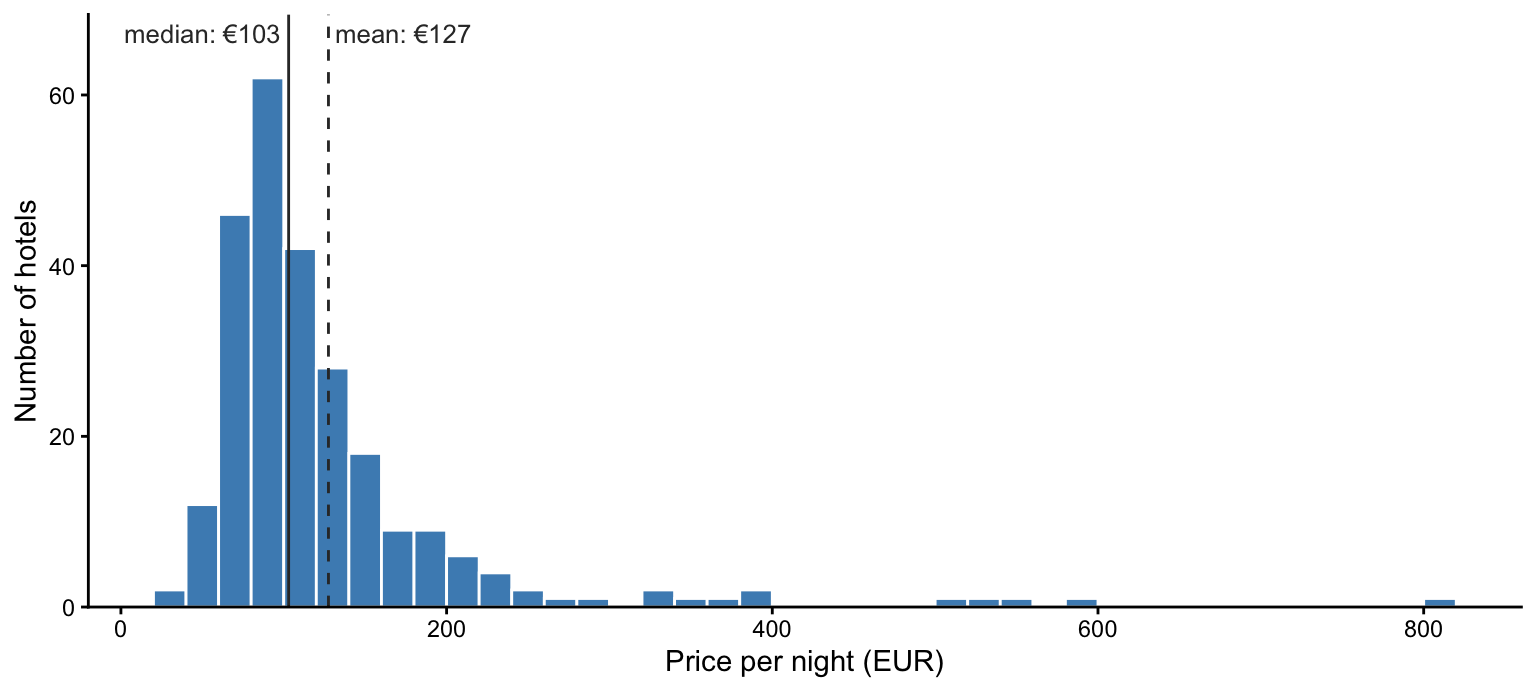
How differently the two react to extreme values shows up best in a thought experiment. Take the full, uncleaned data from Step 1 and pretend that the €1,012 hotel had been entered with one zero too many, as €10,120. One typo in 428 rows. The mean jumps from €131.37 to €152.65; the median stays at €109.50. The median does not care how far out the extreme values are, only on which side of the middle they sit.
5.1 Five questions that decide it
1. What level of measurement? For ordinal variables only the median (or shares, as in Step 6) makes sense — the mean of star categories is the “3.62-star hotel” again. For metric variables, both are possible, and the next questions decide.
2. What shape is the distribution? If it is roughly symmetric, mean and median are close, and either works. If it is skewed or has outliers, the mean is pulled into the tail and no longer describes a typical case. Prices, incomes, wealth, company size, city size: almost always right-skewed. The quickest check is the one above — compute both and see how far apart they are.
3. Typical case, or total? This is the question people forget, and it is the one where you must use the mean. The mean has a property the median lacks: mean × number of cases = total.
Suppose the city considers a tax of 5% on every room-night, and wants to know what one night in the 127 central hotels would bring in (one room each, to keep it simple). The answer is 5% × mean × 127 = €1,031.25, exactly 5% of the sum of all central prices. With the median you would get €850.90 — a number that corresponds to nothing. Whenever something has to add up — revenue, budgets, costs, expected values — use the mean.
4. Will you calculate with it further? Means can be combined, medians cannot. The mean of all hotels is the weighted mean of the band means; the median of all hotels is not the weighted mean of the band medians:
by_band <- only_hotels |>
  group_by(band) |>
  summarise(n = n(), mean = mean(price), median = median(price))

tibble(
  measure             = c("mean", "median"),
  all_hotels          = c(mean(only_hotels$price), median(only_hotels$price)),
  combined_from_bands = c(sum(by_band$n * by_band$mean)   / sum(by_band$n),
                          sum(by_band$n * by_band$median) / sum(by_band$n))
) |>
  mutate(
    all_hotels          = round(all_hotels, 2),
    combined_from_bands = round(combined_from_bands, 2)
  ) |>
  ft()
measure | all_hotels | combined_from_bands |
|---|---|---|
mean | 127.45 | 127.45 |
median | 103.00 | 109.00 |
This is why Step 9 ends up with a weighted average of medians that is not itself a median — the callout in the live coding about “why these euros are not the medians” is this table. It is also why the tools you met in Statistik II — t-tests, regression — are built on means.
5. Is the variable a yes/no? Then the mean is the share, and nothing else makes sense. mean(star_tier %in% c("4 stars", "5 stars")) in Step 6 is a mean, and rightly so.
And one thing neither measure can fix: small groups. With two observations, the median is the mean, and both describe two buildings rather than a pattern.
TipIn practice
Compute both. If they are close, report either — usually the mean. If they are far apart, that is a finding in itself: report the median as the typical value, mention the mean, and say in one sentence why you chose the median. The exemplary solution does this in Q2.
And whenever something has to add up, use the mean.
6 Numbers from a table in your text
Yes — always. It is the house rule from session 3: every number in your prose is inline R code. A number from a table is no exception; it is the most important case, because it is the number most likely to change when you change a filter.
6.1 The pattern: store, extract, insert
Inline code works best when it is short. So it takes three steps:
1. Store the table as an object — do not only print it:
band_prices <- only_hotels |>
  group_by(band) |>
  summarise(n = n(), median_price = median(price))

band_prices |> ft()
band | n | median_price |
|---|---|---|
<1 km | 127 | 134.0 |
1-2 km | 76 | 85.5 |
2-3 km | 23 | 85.0 |
>3 km | 27 | 78.0 |
2. Extract the one value you need, in a chunk with #| echo: false so the reader does not see it:
centre_median <- band_prices |>
  filter(band == "<1 km") |>
  pull(median_price)
centre_median
[1] 1343. Insert the short name inline. The source:
Central hotels charge a median of `r eur(centre_median)` per night.renders as:
Central hotels charge a median of €134 per night.
6.2 Why it fails — the usual suspects
We do not know which error you ran into, so here are the common ones, each with the message R gives.
“could not find function”. eur(), pct() and ft() are not part of R. They are helpers we defined at the top of the live coding. If you use them, copy their definitions into your own setup chunk:
Error in eur(centre_median) : could not find function "eur"“object not found”. The table was printed, but never stored with <-:
only_hotels |>
  group_by(band) |>
  summarise(n = n(), median_price = median(price)) |>
  ft()
band | n | median_price |
|---|---|---|
<1 km | 127 | 134.0 |
1-2 km | 76 | 85.5 |
2-3 km | 23 | 85.0 |
>3 km | 27 | 78.0 |
band_table$median_priceError:
! object 'band_table' not foundTwo variants of the same error: the object exists in your Console because you created it there, but not in the document; or the chunk that creates it sits below the sentence, or has #| eval: false. Quarto renders in a fresh, empty session, top to bottom. Only what the document itself created, above the sentence, exists.
“non-numeric argument to mathematical function”. You stored the table — but after ft(). The object is now a formatted flextable, not a data frame, and its columns are no longer reachable with $:
band_ft <- only_hotels |>
  group_by(band) |>
  summarise(n = n(), median_price = median(price)) |>
  ft()

band_ft$median_priceNULLeur(band_ft$median_price)Error in `round()`:
! non-numeric argument to mathematical functionStore the data; apply ft() only when printing, as in step 1 above.
Several numbers where you wanted one. You forgot to pick the row:
eur(band_prices$median_price)[1] "€134.00" "€85.50" "€85.00" "€78.00" Inline, this prints all four values separated by commas.
Nothing at all. The label does not match exactly. Here an en dash (–) instead of the hyphen (-) that is actually in the data:
band_prices$median_price[band_prices$band == "1–2 km"]numeric(0)eur(band_prices$median_price[band_prices$band == "1–2 km"])[1] "€"No error, just an empty result — and a lone “€” in your sentence.
TipThe habit that prevents all of these
Before you put an expression inline, run it in a chunk. It must return exactly one value. Only then copy it into the sentence.
And remember that running a chunk in RStudio never runs your inline code — that only happens when you render. If rendering stops with an error, the message tells you the line number of the sentence that caused it.
7 if_else(): what it does and why we use it
if_else() does not appear in the live coding — it is in the exemplary solution, in Q2, Q5 and part a of If you finish early. Here is how it works.
7.1 How it works
if_else() takes three things: a condition, a value for where the condition is TRUE, and a value for where it is FALSE. It works element by element — one answer for every value it gets:
stars_small <- c(3, 4, 5, 3.5, 2)

stars_small >= 4
[1] FALSE TRUE TRUE FALSE FALSEif_else(stars_small >= 4, "upscale", "rest")[1] "rest" "upscale" "upscale" "rest" "rest" Read the first line of output first. The condition alone already gives one TRUE or FALSE per element. if_else() does nothing more than translate those TRUE/FALSE values into words (or numbers) a reader understands. And because it gives one answer per element, it fits naturally into mutate(): one answer per row, as a new column.
7.2 Why it is used where it is
Q2 asks whether the upscale segment is worth entering. That question has two groups — upscale or not — but our data has five star tiers. So the solution collapses five into two:
only_hotels |>
  mutate(segment = if_else(star_tier %in% c("4 stars", "5 stars"),
                           "upscale (4-5 stars)", "rest of market")) |>
  group_by(segment) |>
  summarise(n = n(), median_price = median(price), .groups = "drop") |>
  ft()
segment | n | median_price |
|---|---|---|
rest of market | 99 | 82 |
upscale (4-5 stars) | 154 | 124 |
Q5 compares hotels with and without a discount. offer is coded 0 and 1, which means nothing on a chart axis. if_else(offer == 1, "Offer running", "No offer") turns the code into labels.
In both cases you are building what Statistik II calls a dummy variable — the same TRUE/FALSE column, with readable names. And taking the mean() of that TRUE/FALSE column gives you the share, which is exactly what Step 6 does.
7.3 Three things to watch
1. Missing values stay missing. If the condition cannot be evaluated, the result is NA — neither of your two labels:
only_hotels |>
  mutate(well_rated = if_else(rating >= 4.2, "rated 4.2+", "rated below 4.2")) |>
  count(well_rated) |>
  ft()
well_rated | n |
|---|---|
rated 4.2+ | 98 |
rated below 4.2 | 154 |
1 |
There is the hotel without a rating — the empty row at the bottom — from Step 1. That is why the solution filters with !is.na(rating) first. Alternatively, give the missing cases their own label with if_else(…, missing = "not rated"). Either way, Step 1 is where you learn that this will happen.
2. Both answers must be the same type. Text and text, or number and number:
if_else(stars_small >= 4, "upscale", 0)Error in `if_else()`:
! Can't combine `true` <character> and `false` <double>.The older base-R function ifelse(), which you may know from Statistik, does not complain — it silently turns the 0 into the text "0". The strictness of if_else() is a feature: it fails loudly where ifelse() would quietly give you something you did not mean.
3. The result is text, so it sorts alphabetically. If the order matters for a table or chart, make it a factor afterwards: factor(segment, levels = c("rest of market", "upscale (4-5 stars)")).
7.4 Its relatives
| You need… | Use | Example |
|---|---|---|
| two groups from one condition | if_else() |
upscale or not |
| more than two groups from conditions | case_when() |
see below |
| groups from ranges of a number | cut() |
band |
| labels for numeric codes | factor(x, levels = …, labels = …) |
star_tier |
case_when() is if_else() with more than two outcomes. It checks the conditions in order and takes the first one that is TRUE:
only_hotels |>
  filter(!is.na(rating)) |>
  mutate(rating_group = case_when(
    rating >= 4.5 ~ "excellent",
    rating >= 4   ~ "good",
    TRUE          ~ "below 4"
  )) |>
  count(rating_group) |>
  ft()
rating_group | n |
|---|---|
below 4 | 76 |
excellent | 50 |
good | 126 |
The final TRUE ~ catches everything no earlier line caught. And notice the order of the rows: alphabetical, exactly as point 3 above warned.
8 A checklist for your own data
Everything above, as questions to ask of any dataset — including the one in Report 1:
- Look first.
glimpse()andcolSums(is.na(…)): what types, what is missing? (Step 1) - What is one row? Are all rows the same kind of thing — or are you comparing hotels with apartments? (Step 6)
- What does not belong? Remove it, and say in the report that you did. (Step 2)
- Amount or group? For every variable you use: numbers stay numbers, groups become factors — merged first if needed. (Step 4)
- What shape? Compute mean and median before choosing between them.
- How big are the groups? Print
n. Re-run without tiny groups and see if the result survives. (Steps 8 and 9) - Which third variable? Could something else explain the difference you see? Compare within its categories. (Steps 6 to 9)
- Round only for the reader. Keep full precision in everything you calculate with.
- Every number in your text is inline code. Store, extract, insert.