library(tidyverse)  # Standard packages for data transformation
library(flextable)  # For printing nice tables in Quarto

hotels <- read_csv("data/hotels-vienna.csv")Live coding: is the centre expensive because it is central?
Session 2 — Applied Data Science 2026
The question
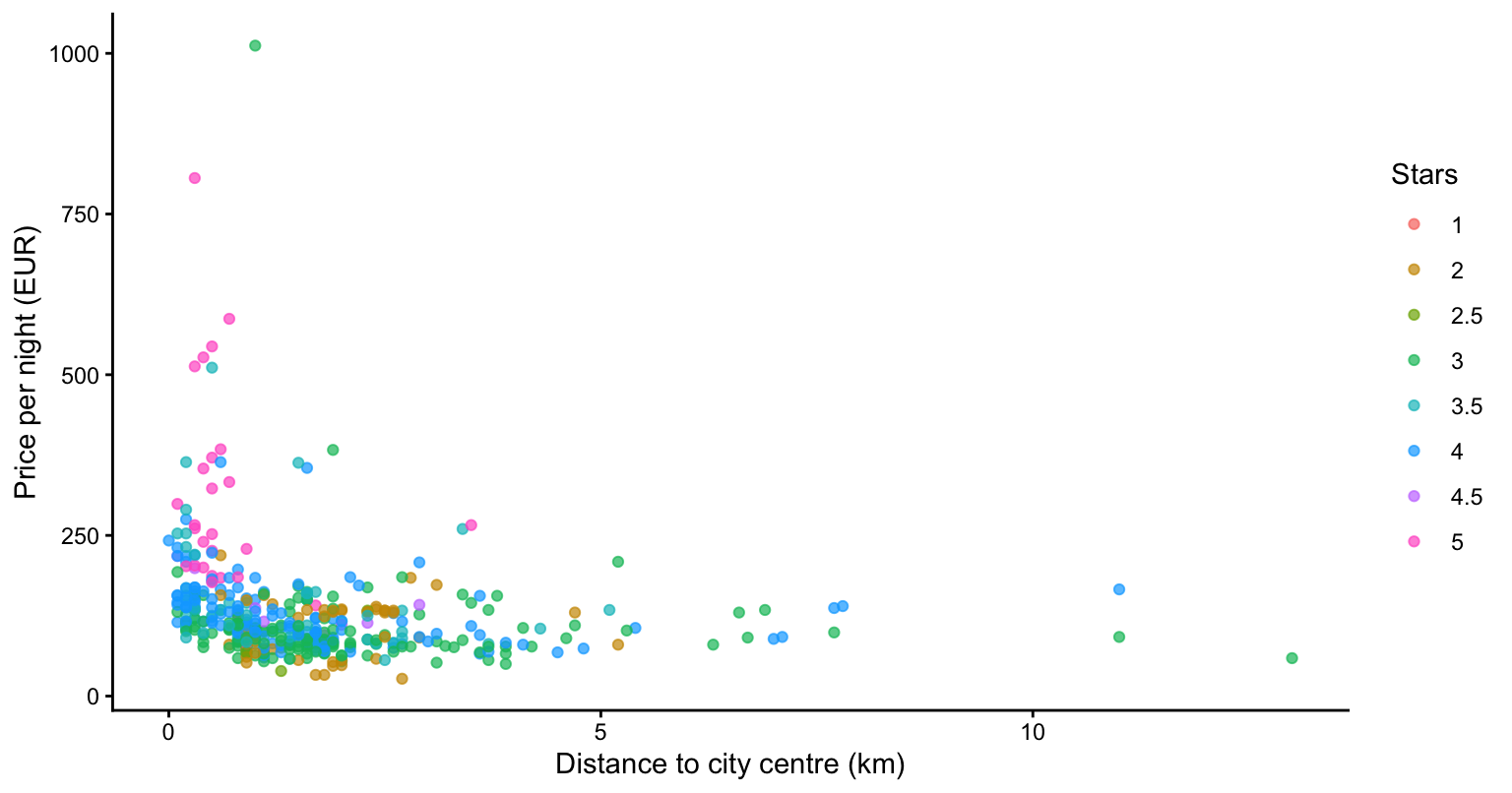
Last week’s chart (see Figure 1) showed that hotels near the centre of Vienna cost more. It also showed that the central ones tended to have more stars — look at the colours bunched along the left edge.
So is the centre expensive because it is central, or because that is where the good hotels happen to be?
Today we find out — with five verbs from the tidyverse framework, using this task as a general recap of basic R skills.
NoteBackground reading
If objects, vectors and data frames feel shaky, these two go through them properly and take about twenty minutes each:
The second one covers factors, which we use in Step 4 below. The first part of this sequence covers functions more generally and might be a good follow-up reading.
1 Step 1: look before you leap
glimpse() shows every column, its type, and the first few values. Read the types: <chr> is text, <dbl> is a number:
glimpse(hotels)Rows: 428
Columns: 24
$ country <chr> "Austria", "Austria", "Austria", "Austria", "Austri…
$ city_actual <chr> "Vienna", "Vienna", "Vienna", "Vienna", "Vienna", "…
$ rating_count <dbl> 36, 189, 53, 55, 33, 25, 57, 161, 50, NA, 203, 251,…
$ center1label <chr> "City centre", "City centre", "City centre", "City …
$ center2label <chr> "Donauturm", "Donauturm", "Donauturm", "Donauturm",…
$ neighbourhood <chr> "17. Hernals", "17. Hernals", "Alsergrund", "Alserg…
$ price <dbl> 81, 81, 85, 83, 82, 229, 103, 150, 80, 153, 60, 128…
$ city <chr> "Vienna", "Vienna", "Vienna", "Vienna", "Vienna", "…
$ stars <dbl> 4.0, 4.0, 4.0, 3.0, 4.0, 5.0, 4.0, 4.0, 2.0, 3.0, 4…
$ ratingta <dbl> 4.5, 3.5, 3.5, 4.0, 3.5, 4.5, 3.5, 4.5, 3.5, NA, 4.…
$ ratingta_count <dbl> 216, 708, 629, 52, 219, 27, 251, 617, 146, NA, 359,…
$ scarce_room <dbl> 1, 0, 0, 0, 1, 1, 1, 0, 1, 1, 1, 0, 1, 1, 1, 0, 0, …
$ hotel_id <dbl> 21894, 21897, 21901, 21902, 21903, 21904, 21906, 21…
$ offer <dbl> 1, 1, 1, 1, 1, 1, 0, 0, 1, 1, 1, 0, 1, 1, 0, 1, 1, …
$ offer_cat <chr> "15-50% offer", "1-15% offer", "15-50% offer", "15-…
$ year <dbl> 2017, 2017, 2017, 2017, 2017, 2017, 2017, 2017, 201…
$ month <dbl> 11, 11, 11, 11, 11, 11, 11, 11, 11, 11, 11, 11, 11,…
$ weekend <dbl> 0, 0, 0, 0, 0, 0, 0, 0, 0, 0, 0, 0, 0, 0, 0, 0, 0, …
$ holiday <dbl> 0, 0, 0, 0, 0, 0, 0, 0, 0, 0, 0, 0, 0, 0, 0, 0, 0, …
$ distance <dbl> 2.7, 1.7, 1.4, 1.7, 1.2, 0.9, 0.9, 1.0, 0.7, 1.5, 1…
$ distance_alter <dbl> 4.4, 3.8, 2.5, 2.5, 2.8, 3.0, 2.4, 2.7, 2.7, 2.7, 2…
$ accommodation_type <chr> "Apartment", "Hotel", "Hotel", "Hotel", "Hotel", "A…
$ nnights <dbl> 1, 1, 1, 1, 1, 1, 1, 1, 1, 1, 1, 1, 1, 1, 1, 1, 1, …
$ rating <dbl> 4.4, 3.9, 3.7, 4.0, 3.9, 4.8, 3.9, 4.6, 3.5, NA, 4.…Also check for missing values before anything else:
colSums(is.na(hotels)) country city_actual rating_count center1label
0 0 35 0
center2label neighbourhood price city
0 0 0 0
stars ratingta ratingta_count scarce_room
0 103 103 0
hotel_id offer offer_cat year
0 0 0 0
month weekend holiday distance
0 0 0 0
distance_alter accommodation_type nnights rating
0 0 0 35 Four columns have gaps, and they come in pairs: rating and rating_count are missing for the same 35 hotels, ratingta and ratingta_count for the same 103. That makes sense — if nobody rated a hotel there is no rating and no count of ratings. Nothing else is missing.
Worth knowing now rather than discovering it inside a calculation. It is not necessarily a problem, but we must take it into account when interpreting the results.
2 Step 2: filter() — clean up what we found last week
Two problems from session 1: ten hotels that are not in Vienna, and one implausible €1,012 three-star hotel. These values should be removed, and this removal must be made explicit when we report our results later on.
hotels_clean <- hotels |>
  filter(city_actual == "Vienna", price < 1000)

nrow(hotels)
[1] 428nrow(hotels_clean)[1] 417A comma between conditions means and. We lose 11 rows.
TipAlways check the row count after filtering
If it drops to zero, you have made a mistake — and R will not tell you. If it drops much more than you expected, your condition is wrong.
For or, use |:
hotels_clean |>
  filter(stars == 5 | stars == 4.5) |>
  nrow()
[1] 35Notice how awkward that already is: to ask for “the very best hotels” we have to name two values, because the ratings include half stars. Step 4 fixes this properly.
WarningThe classic mistake
filter(hotels, stars = 5)   # error
filter(hotels, stars == 5)  # correct
One = assigns a value. Two == makes an equality check.
3 Step 3: select() and arrange()
hotels_clean |>
  select(price, stars, distance, rating, accommodation_type) |>
  arrange(desc(price)) |>
  head(5) |>
  ft()
price | stars | distance | rating | accommodation_type |
|---|---|---|---|---|
806 | 5 | 0.3 | 4.5 | Hotel |
587 | 5 | 0.7 | 1.0 | Hotel |
544 | 5 | 0.5 | 4.8 | Hotel |
527 | 5 | 0.4 | 4.8 | Hotel |
513 | 5 | 0.3 | 4.8 | Hotel |
desc() sorts high to low. Useful select() variants:
select(hotels_clean, -ratingta, -ratingta_count)  # drop columns
select(hotels_clean, price:stars)                 # a range
select(hotels_clean, starts_with("rating"))       # by name pattern
You can read more about such selection helpers here.
NoteWhat is
|> ft() doing at the end?
Nothing statistical — it is only about how the table looks. R prints a data frame as plain monospaced text, which is fine on screen and ugly in a report. ft() turns it into a proper typeset table.
It is not a function R ships with. It is one we defined ourselves, once, at the top of this document:
ft <- function(x) x |> flextable() |> theme_vanilla() |> autofit()Read it as: take the table, make it a flextable, apply the plain theme_vanilla look, and size the columns to fit. Writing those three steps once and giving them a short name means every table in the document comes out identically — and if you later decide you prefer a different look, you change one line instead of thirty.
You are expected to do this in your reports. Define ft() once in your setup chunk, then end every table pipeline with |> ft(). Leave it off when you just want a quick look at something while coding. But we will discuss it in more detail in section 3 about Quarto!
4 Step 4: mutate() — make the variables you need
We need two new variables before we can compare anything.
4.1 Distance bands
Distance is a continuous number, which is awkward for comparing groups. Let us cut it into bands:
hotels_clean <- hotels_clean |>
  mutate(
    band = cut(
      distance,
      breaks = c(-0.1, 1, 2, 3, 100),
      labels = c("<1 km", "1-2 km", "2-3 km", ">3 km")
    )
  )

count(hotels_clean, band) |> ft()
band | n |
|---|---|
<1 km | 182 |
1-2 km | 142 |
2-3 km | 51 |
>3 km | 42 |
4.2 Star tiers — and what to do about half stars
Look at what stars actually contains:
count(hotels_clean, stars) |> ft()stars | n |
|---|---|
1.0 | 1 |
2.0 | 47 |
2.5 | 5 |
3.0 | 134 |
3.5 | 57 |
4.0 | 138 |
4.5 | 8 |
5.0 | 27 |
Two problems. First, there are half stars, which splits the data into eight groups, several of them far too small to say anything about. Second, stars is stored as a number (<dbl>) even though it is really a category — R would happily compute a mean star rating of 3.43, which is not a thing that exists.
Both are fixed in one mutate(): round the half stars up, then convert to a factor.
hotels_clean <- hotels_clean |>
  mutate(
    star_tier = factor(
      floor(stars + 0.5),
      levels = 1:5,
      labels = paste(1:5, "stars")
    )
  )

count(hotels_clean, star_tier) |> ft()
star_tier | n |
|---|---|
1 stars | 1 |
2 stars | 47 |
3 stars | 139 |
4 stars | 195 |
5 stars | 35 |
WarningDo not use
round() here
R’s round() does not do what you learned at school. It rounds halves to the nearest even number:
round(2.5)[1] 2round(3.5)[1] 4round(4.5)[1] 4So round() would send 2.5 down to 2 and 4.5 down to 4, but 3.5 up to 4 — inconsistent, and silently so. floor(x + 0.5) rounds halves up every time, which is what we want here.
This is called banker’s rounding, and it is deliberate: it stops rounding errors accumulating in one direction. It is still almost never what you want when binning categories.
NoteWhy bother making it a factor?
A factor is R’s type for a categorical variable with a fixed set of possible values. Three things change once star_tier is a factor:
- R stops treating it as a number, so nobody can accidentally take its mean
- The order is fixed and meaningful, so tables and charts come out in the right order rather than alphabetically
- R knows which categories could exist, even when none are observed — see the warning below
Factors are covered in detail in R object types III.
WarningTwo similar-looking arguments that do different things
You will encounter both of these arguments today. They are not the same, and the names are unhelpfully alike:
| Argument | Belongs to | What it does |
|---|---|---|
.drop = FALSE |
group_by(), count() |
Keep categories that have no observations, showing them with n = 0 |
.groups = "drop" |
summarise() |
Remove the grouping left over after summarising, so later steps are not silently grouped |
The default for .drop is TRUE, which means empty groups disappear from your output without warning — even for factors. That is why the five-star table in Step 8 uses .drop = FALSE: without it you would never see that one distance band is completely empty.
5 Step 5: group_by() + summarise() — the raw gap
hotels_clean |>
  group_by(band) |>
  summarise(
    n            = n(),
    median_price = median(price)
  ) |>
  ft()
band | n | median_price |
|---|---|---|
<1 km | 182 | 133.5 |
1-2 km | 142 | 92.5 |
2-3 km | 51 | 95.0 |
>3 km | 42 | 92.5 |
There it is: €133.50 within a kilometre of the centre, about €92.50 just outside. A gap of roughly €41.
ImportantThis is not the answer — it is the question, with a number attached
It is tempting to stop here and report “central properties charge €41 more”. But we have not compared hotels in different places. We have compared whatever happens to sit in each ring of the city — different star ratings, and not even all of them hotels.
The number is real. What it measures is the open question. Everything from here is the work of narrowing down what it is actually made of.
6 Step 6: but we are comparing apples with pears
The dataset is not only hotels — it also contains apartments, which are priced per unit rather than per room. Let us hold that constant:
only_hotels <- hotels_clean |>
  filter(accommodation_type == "Hotel")

nrow(only_hotels)
[1] 253only_hotels |>
group_by(band) |>
summarise(
n = n(),
median_price = median(price),
share_upscale = round(mean(star_tier %in% c("4 stars", "5 stars")), 2)
) |>
ft()band | n | median_price | share_upscale |
|---|---|---|---|
<1 km | 127 | 134.0 | 0.69 |
1-2 km | 76 | 85.5 | 0.54 |
2-3 km | 23 | 85.0 | 0.61 |
>3 km | 27 | 78.0 | 0.41 |
Among hotels alone the pattern is cleaner and stronger: €134 in the centre against €85.50 just outside it — a gap of about €48.50.
But look at the last column. 69.3% of central hotels are in the top two tiers, against 53.9% of those 1–2 km out. The central ones really are fancier. So some part of that €48.50 is not location at all — it is quality.
NoteWhy a share and not an average star rating
We could have written mean(stars) — but two slides ago we said a mean star rating is a number no hotel can have. Averaging a category is exactly the mistake the factor was meant to prevent, and we should not make it ourselves one step later.
A share avoids the problem entirely: “69% of these hotels are four-star or better” is a statement about counts, and every reader knows what it means.
7 Step 7: compare like with like
The crude fix: look at one star tier at a time.
only_hotels |>
  filter(star_tier == "3 stars") |>
  group_by(band) |>
  summarise(n = n(), median_price = median(price)) |>
  ft()
band | n | median_price |
|---|---|---|
<1 km | 31 | 98 |
1-2 km | 30 | 82 |
2-3 km | 7 | 81 |
>3 km | 16 | 77 |
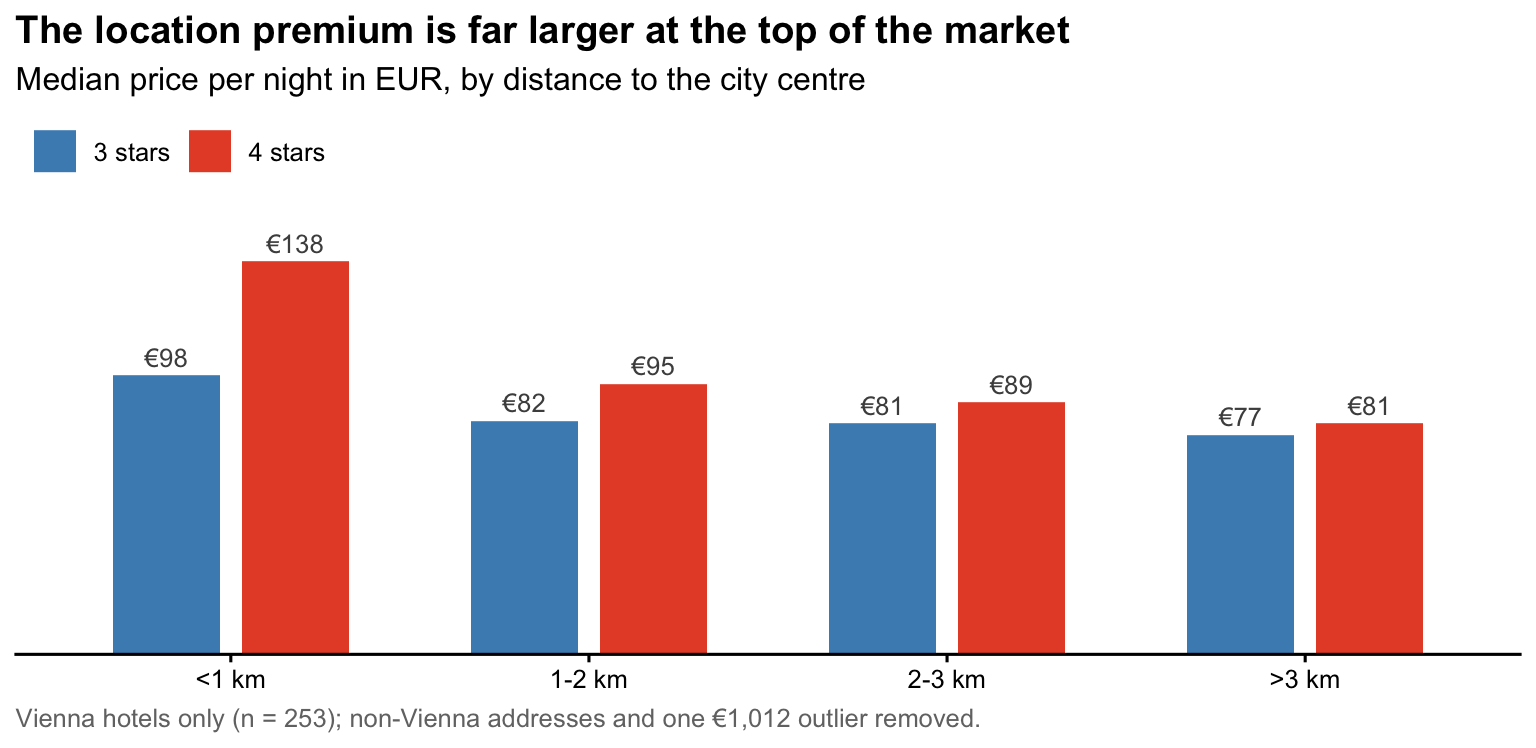
Among three-star hotels only, the gap between the centre and 1–2 km out is €98 against €82 — about €16, down from €48.50. So for budget hotels, most of the apparent location premium was really a quality difference.
Now the same for four-star hotels:
only_hotels |>
  filter(star_tier == "4 stars") |>
  group_by(band) |>
  summarise(n = n(), median_price = median(price)) |>
  ft()
band | n | median_price |
|---|---|---|
<1 km | 63 | 138.0 |
1-2 km | 39 | 95.0 |
2-3 km | 12 | 88.5 |
>3 km | 11 | 81.0 |
€138 against €95 — a gap of €43, which has barely shrunk at all.
8 Step 8: so what about five-star hotels?
The obvious next question. Let us ask it:
only_hotels |>
  filter(star_tier == "5 stars") |>
  group_by(band, .drop = FALSE) |>
  summarise(n = n(), median_price = median(price), .groups = "drop") |>
  ft()
band | n | median_price |
|---|---|---|
<1 km | 25 | 252.0 |
1-2 km | 2 | 113.5 |
2-3 km | 2 | 128.0 |
>3 km | 0 |
Note the .drop = FALSE. Without it the last row would not be there at all — and a table showing three bands looks like a complete answer.
ImportantWe cannot answer it — and that is the finding
There are 29 five-star hotels in the data, and 25 of them are within one kilometre of the centre. The outer bands have almost nothing in them.
You cannot ask “how much more can a central five-star hotel charge?” when there are essentially no five-star hotels outside the centre to compare it with. There is no comparison to make. Any number you computed from the outer bands would be the price of one or two specific buildings, not a pattern.
This is not a flaw in the data. It is a fact about Vienna: luxury hotels are built in the centre, full stop. But it does mean the question has to change — either accept that five-star and central are the same thing here, or go and find data on a city where they are not.
TipThe habit worth taking from this
Always print n alongside your summary statistic. A median computed from two observations looks exactly like a median computed from two hundred, and nothing in the output warns you.
Most confidently wrong findings are not arithmetic errors. They are real calculations run on groups too small to support them.
9 Step 9: how much of the gap is just a different mix of hotels?
Step 7 compared one tier at a time. That answers “what is the premium for a three-star hotel” — but it never puts the pieces back together into one statement about the market.
Here is the question we actually want to answer. Two things differ between the centre and the ring outside it:
- Prices. A four-star hotel charges more in the centre than a four-star hotel further out.
- The mix. The centre simply holds more four- and five-star hotels.
Both push the central average up, and the €48.50 gap from Step 6 is the two of them added together. We want them apart.
NoteThe intuition, before any code
Suppose every star tier charged exactly the same price in both bands. The centre would still look more expensive, simply because it holds more expensive kinds of hotel. That part of the gap has nothing to do with location.
So: what would the centre charge if it kept its own prices but had the same mix of star ratings as the ring outside? Whatever is left after that is the part location is responsible for.
9.1 Build one table with both bands side by side
Start with the tier-by-tier picture in each band — how many hotels, and what the typical one charges:
tiers <- only_hotels |>
  filter(band %in% c("<1 km", "1-2 km")) |>
  group_by(band, star_tier) |>
  summarise(n = n(), median_price = median(price), .groups = "drop")

tiers |> ft()
band | star_tier | n | median_price |
|---|---|---|---|
<1 km | 1 stars | 1 | 81.0 |
<1 km | 2 stars | 7 | 75.0 |
<1 km | 3 stars | 31 | 98.0 |
<1 km | 4 stars | 63 | 138.0 |
<1 km | 5 stars | 25 | 252.0 |
1-2 km | 2 stars | 5 | 56.0 |
1-2 km | 3 stars | 30 | 82.0 |
1-2 km | 4 stars | 39 | 95.0 |
1-2 km | 5 stars | 2 | 113.5 |
That is the right information in the wrong shape: to compare a tier across bands we want the two bands side by side, one row per tier. So split it in two and glue it back together on star_tier:
centre <- tiers |>
  filter(band == "<1 km") |>
  select(star_tier, n_centre = n, m_centre = median_price)

outer <- tiers |>
  filter(band == "1-2 km") |>
  select(star_tier, n_outer = n, m_outer = median_price)

centre |> left_join(outer, by = "star_tier") |> ft()
star_tier | n_centre | m_centre | n_outer | m_outer |
|---|---|---|---|---|
1 stars | 1 | 81 | ||
2 stars | 7 | 75 | 5 | 56.0 |
3 stars | 31 | 98 | 30 | 82.0 |
4 stars | 63 | 138 | 39 | 95.0 |
5 stars | 25 | 252 | 2 | 113.5 |
Note
left_join() — the sixth verb
select(star_tier, n_centre = n) renames while selecting: the column called n arrives as n_centre. Without that, both halves would carry a column called n and we could not tell them apart.
left_join(x, y, by = "star_tier") glues y onto x, matching rows where star_tier agrees. Left means every row of x survives; where y has no match, the new columns are filled with NA.
Joining is how real analysis assembles data — prices in one file, features in another, a common ID between them. It comes back properly in session 3, and in session 5 you cannot get the data at all without it.
Look at the one-star row: both outer cells are empty. That blank is NA — we do not know — and here it means there is nothing to know. There is exactly one one-star hotel in the data, it sits in the centre, and no one-star hotel outside exists to compare it against. The Step 8 problem in miniature.
A tier present in only one band tells us nothing about differences between bands, so we drop it.
Then the piece we actually came for: each band’s star composition — of all the hotels in this band, what fraction sits in this star tier? That is a count divided by the band’s own total:
comparison <- centre |>
  left_join(outer, by = "star_tier") |>
  filter(!is.na(m_outer)) |>               # tiers present in BOTH bands
  mutate(
    # of all CENTRAL hotels, the fraction in this star tier
    star_mix_centre = n_centre / sum(n_centre),
    # of all hotels 1-2 km OUT, the fraction in this star tier
    star_mix_outer  = n_outer  / sum(n_outer)
  )

comparison |>
  mutate(                                            # rounded for READING
    star_mix_centre = round(star_mix_centre, 2),     # only — `comparison`
    star_mix_outer  = round(star_mix_outer,  2)      # keeps full precision
  ) |>
  ft()
star_tier | n_centre | m_centre | n_outer | m_outer | star_mix_centre | star_mix_outer |
|---|---|---|---|---|---|---|
2 stars | 7 | 75 | 5 | 56.0 | 0.06 | 0.07 |
3 stars | 31 | 98 | 30 | 82.0 | 0.25 | 0.39 |
4 stars | 63 | 138 | 39 | 95.0 | 0.50 | 0.51 |
5 stars | 25 | 252 | 2 | 113.5 | 0.20 | 0.03 |
ImportantRead those two columns downwards, not across
star_mix_centre is the star composition of the centre: it answers “out of every hundred hotels within a kilometre, how many are three-star?” Each column describes one band on its own, and each therefore adds up to 1:
comparison |>
  summarise(centre = sum(star_mix_centre), outer = sum(star_mix_outer)) |>
  ft()
centre | outer |
|---|---|
1 | 1 |
It is not “what share of all three-star hotels is central” — that would read across the row, and it is a different question we are not asking. Whenever you build shares, say out loud which way they sum to one. Getting that backwards is one of the commonest ways a table quietly means the opposite of what you think.
TipRound for the reader, never for the calculation
star_mix_centre for the two-star tier is really 0.055556, not 0.06. Eight decimals in a printed table are noise — nobody reads them and they make the column hard to scan.
But notice where the rounding happens: in the pipeline that prints, not in the one that stores. The object comparison still holds the exact shares, so the weighted averages in the next step are computed from full precision. Round a number you are about to compute with and the error travels.
House rule for this course: never more than two decimals in a reported number, fewer where that is enough. Whole numbers get none.
Put the two composition columns next to each other and the problem is visible without any arithmetic at all. Of every hundred hotels in the centre, about 20 are five-star; one to two kilometres out it is about 3. At the other end, three-star hotels are 25% of the centre against 39% outside. These are two differently composed markets, and that alone would push the central average up even if every tier charged the same in both.
9.2 The three averages
Now the what-if, as three weighted averages of the same tier medians. A weighted average multiplies each tier’s price by that tier’s share of the band and adds the results up. Because the star composition is one of the two inputs, swapping in a different composition changes the answer even though no price moves — and that is exactly the lever we want:
averages <- comparison |>
  summarise(
    # euros, so cents are enough — and this is the last calculation
    centre_as_is     = round(sum(star_mix_centre * m_centre), 2),
    centre_outer_mix = round(sum(star_mix_outer  * m_centre), 2),
    outside          = round(sum(star_mix_outer  * m_outer),  2)
  )

averages |> ft()
centre_as_is | centre_outer_mix | outside |
|---|---|---|
147.28 | 121.07 | 87.79 |
Three lines, and only one thing changes between each pair:
| Whose prices? | Whose star mix? | |
|---|---|---|
centre_as_is |
centre | centre |
centre_outer_mix |
centre | 1–2 km out |
outside |
1–2 km out | 1–2 km out |
Going from row 1 to row 2, the prices stay central and only the star mix changes — so that difference is composition. Going from row 2 to row 3, the star mix stays fixed and only the prices change — so that difference is location.
9.3 Splitting the gap
gap_split <- averages |>
  mutate(
    total       = centre_as_is     - outside,           # the whole gap
    composition = centre_as_is     - centre_outer_mix,  # different hotels
    location    = centre_outer_mix - outside            # same hotels, closer
  ) |>
  select(total, composition, location)

gap_split |> ft()
total | composition | location |
|---|---|---|
59.49 | 26.21 | 33.28 |
The centre charges €147.28 on average as it actually is. With its own prices but the outer ring’s mix of hotels it would charge €121.07. The ring outside charges €87.79. So the €59.49 gap is about €26.21 composition and €33.28 location — roughly 44% of it is the centre simply holding fancier hotels.
WarningWhy these euros are not the medians from the tables above
€147.28 is not the median central price — that was €134 in Step 6. It is a weighted average of the tier medians, and it has to be, because you cannot reweight a median. Holding a mix fixed means attaching shares to numbers and adding them up, which is what a weighted average does and what a median cannot.
It is a what-if quantity, not a description of any hotel. Report it as “comparing like with like, the gap is about €33.28”, never as “the median central hotel costs €147.28”.
9.4 Now be suspicious of your own answer
That is a clean-looking result. Before believing it, look at which hotels are carrying it — the habit from Step 8, applied to a number we computed ourselves.
The five-star row of comparison rests on 2 hotels outside the centre. It also carries the biggest price difference in the table. Run exactly the same arithmetic without it — same code, one extra filter(), and the shares recomputed because dropping a tier changes what the rest add up to:
gap_split_no5 <- comparison |>
  filter(star_tier != "5 stars") |>
  mutate(
    star_mix_centre = n_centre / sum(n_centre),       # compositions redone
    star_mix_outer  = n_outer  / sum(n_outer)         # over 4 tiers now
  ) |>
  summarise(                                          # same averages
    centre_as_is     = round(sum(star_mix_centre * m_centre), 2),
    centre_outer_mix = round(sum(star_mix_outer  * m_centre), 2),
    outside          = round(sum(star_mix_outer  * m_outer),  2)
  ) |>
  mutate(                                             # same differences
    total       = centre_as_is     - outside,
    composition = centre_as_is     - centre_outer_mix,
    location    = centre_outer_mix - outside
  ) |>
  select(total, composition, location)

gap_split_no5 |> ft()
total | composition | location |
|---|---|---|
34.27 | 3.83 | 30.44 |
Composition falls from €26.21 to €3.83 — from 44% of the gap to 11%.
ImportantThe honest answer, and it is the lesson of the session
Composition matters: the centre really does hold fancier hotels, and part of the raw gap is that rather than location. But how much swings from 44% to 11% depending on a tier holding 2 hotels.
We can report the direction. We cannot report the share. Same lesson as Step 8, reached from the other end: check n before you believe a difference — including one you computed yourself, three steps deep, in a table that looked perfectly convincing.
10 Step 10: from table to chart
A pipeline’s output is just another data frame, so it goes straight into ggplot():
plot_data <- only_hotels |>
  filter(star_tier %in% c("3 stars", "4 stars")) |>
  group_by(band, star_tier) |>
  summarise(median_price = median(price), .groups = "drop")

ggplot(plot_data, aes(x = band, y = median_price, fill = star_tier)) +
  geom_col(position = position_dodge(width = 0.72), width = 0.6) +
  geom_text(
    aes(label = paste0("€", floor(median_price + 0.5))),
    position = position_dodge(width = 0.72),
    vjust = -0.5, size = 3.4, colour = "grey30"
  ) +
  scale_fill_manual(values = c("3 stars" = "#4C8DBF", "4 stars" = "#E65032")) +
  scale_y_continuous(expand = expansion(mult = c(0, 0.10))) +
  labs(
    title = "The location premium is far larger at the top of the market",
    subtitle = "Median price per night in EUR, by distance to the city centre",
    x = NULL, y = NULL, fill = NULL,
    caption = paste0("Vienna hotels only (n = ", nrow(only_hotels),
                     "); non-Vienna addresses and one ", eur(max(hotels$price), 0),
                     " outlier removed.")
  ) +
  theme_classic(base_size = 12) +
  theme(
    legend.position = "top",
    legend.justification = "left",
    axis.line.y = element_blank(),
    axis.ticks.y = element_blank(),
    axis.text.y = element_blank(),
    plot.title = element_text(face = "bold"),
    plot.title.position = "plot",
    plot.caption = element_text(colour = "grey45", hjust = 0),
    plot.caption.position = "plot"
  )
TipWhat makes that chart readable — the rules behind each line
We do this properly in sessions 5 and 6. For now, the short version, because every one of these is a line you can copy:
- The title states the finding, not the variables. “Median price by band” is a label; “the location premium is far larger at the top of the market” is a sentence a reader can disagree with. The subtitle carries the units.
- The numbers sit on the bars, so the y axis is deleted. Printing both is redundant, and a grid the reader has to trace with a finger is worse than a label.
axis.text.y = element_blank()and friends. - Bars start at zero. Always, for bars — their length is the quantity. (A truncated axis is the classic way to make a small difference look huge; we come back to it in session 6.)
- Two colours, chosen so they survive colour blindness and printing in grey — blue and orange differ in lightness as well as hue, which red and green do not. Not decoration: the colour is the star tier here.
- Everything not carrying information is turned down: no gridlines, no box, grey caption, and the legend moved to the top-left where it is read before the bars rather than after them.
- The caption says what was removed. A chart that hides its cleaning is a chart nobody can check.
One in-joke worth noticing: the labels use floor(x + 0.5), not round(). With round(), the €88.5 bar would print as €88 while the table said 88.5 — the same banker’s-rounding trap from Step 4, showing up in a place nobody checks.
Note
.groups = "drop"
After grouping by two variables, summarise() leaves the result grouped by the first. .groups = "drop" removes that and avoids surprises later. Add it whenever you group by more than one variable.
11 Step 11: back to the question
We opened with: is the centre expensive because it is central, or because that is where the good hotels are? Here is what the five verbs bought us.
ImportantWhat we can say
- The raw gap between the centre and the first ring out is about €48.50 — and it is not a location premium
- Both things are true: the centre holds fancier hotels (composition) and the same hotel charges more there (location)
- Holding the star tier fixed, the premium is about €16 for three-star hotels and €43 for four-star ones — roughly 2.7 times as large at the top of the market
- For five-star hotels the question cannot be answered from this data at all
A single average would have hidden every one of those — and the difference between the three- and four-star premium is exactly the kind of thing a pricing decision turns on.
11.1 So why not just run a regression?
That is the right instinct, and it is the honest next question. A regression of price on distance and star tier would do in one line what Steps 6 to 9 did in four tables: report the distance effect holding the star tier constant. It would use every hotel at once instead of splitting them into ever-smaller cells, and it would put an honest margin of error on the answer — which is precisely what we could not do in Step 9.
So why spend a session slicing by hand?
NoteThree reasons, and the third is the important one
1. A regression coefficient is a comparison of group averages. If you have never built that comparison by hand, the coefficient is a number the computer gave you. Having done it once, “the distance coefficient holds stars constant” describes something you have actually seen happen.
2. Slicing shows you what a coefficient hides. A regression with one distance term reports one premium. We found that the premium is 2.7 times larger for four-star hotels than three-star ones, and undefined for five-star ones. That is real structure, and a simple regression would average it into a single number without complaining.
3. A regression would not have told you that Step 8 was unanswerable. Feed it the five-star hotels and it returns a coefficient and a standard error like any other. Nothing in the output says “this rests on two buildings.” The habit of looking at n first is not replaced by better tools — it is what makes better tools safe to use.
WarningWhat regression still would not give us
It would not make the answer causal. “Four-star hotels within a kilometre charge €43 more, holding stars constant” is still a statement about what hotels charge, not about what a location is worth. Central hotels differ in ways this dataset does not record — the building, the rooms, the management, the view. Holding constant what you happen to have measured is not the same as holding everything constant.
That gap — between a comparison that controls for what you measured and a claim about cause — never fully closes. It is the distinction between describing and predicting, and it is why session 8 is called from explaining to predicting.
Where this goes. Notice what happened to the workflow: two variables, four tables. Add guest rating, neighbourhood and accommodation type and the approach collapses — and Step 9 showed that our answer was already resting on cells of two hotels. That is the honest motivation for regression: not that slicing by hand is wrong, but that it does not scale and it cannot tell you how sure it is.
Session 8 picks it up from exactly here.
12 Recap
| Verb | Question it answers |
|---|---|
filter() |
Which rows do I care about? |
select() |
Which columns do I care about? |
mutate() |
What do I need that is not there yet? |
arrange() |
What is at the top? |
group_by() + summarise() |
How does it differ across groups? |
TipBuild pipelines one line at a time
Write a line, run it, look at the output, add the next. Debugging a six-verb pipeline whose middle you have never seen is miserable.
NoteReading after this session