library(tidyverse)  # Standard packages for data transformation
library(flextable)  # For printing nice tables in Quarto
library(here)       # For file paths that keep working — see below

hotels <- read_csv("data/hotels-vienna.csv")Live coding: the essential features of a quarto report
Session 3 — Applied Data Science 2026
The goal of this session
Last week we answered a question: among four-star hotels in Vienna, the central ones charge more than those a kilometre or two out. We answered it “in the console”, and without describing, interpreting and presenting the code via accompanying prosa.
This is not how you use your results in practice. Usually, you need to write a report about your research. Assume, for instance, that the board or our hotel company wants you to answer their question in a document: Two pages, one chart, one table, a number they can quote in a meeting.
Quarto is meant to help you deliver exactly that (and much more). To see how, we take these four steps:
- What a Quarto document is — the header, the text, the chunks.
- Why the render is not your console. This is the one that explains everything else, so it comes early rather than late.
- What that buys you — numbers that cannot go stale, figures and tables you can refer to by name, citations that format themselves.
- Where it goes next, and what to do when it breaks.
NoteWhat we did live, and what is here to read
This document is longer than the live coding in class. That is deliberate — it is meant as an accompanying read, not a transcript.
1 The anatomy of a Quarto document
Three kinds of content, and nothing else:
| Part | What it is | How you write it |
|---|---|---|
| YAML header | Settings for the whole document | Between the two --- lines at the top |
| Text | Prose, in Markdown | Just type it |
| Code chunks | R that runs when the document is built | Between ```{r} and ``` |
Plus one thing that sits in between but is super helpful: inline code, which puts a computed value into a sentence.
1.1 Starting one
In RStudio: File → New File → Quarto Document. A dialog appears and you should click on Create Empty Document. Once the document opens, switch to the Source editor and remove the line editor: visual. The visual editor hides the source, and the source is what we are here to learn.
Then two housekeeping steps:
- Save it immediately, e.g., as
session03.qmd. - Save it next to your
.Rprojfile, withdata/beside it. Everything in this course assumes that shape, and Section 5 explains what breaks when you depart from it.1
NoteShould quarto documents always sit at the root?
In most cases you encounter in this course, you only have one Quarto document. In such cases, putting the Quarto document simply into the project root is a natural choice. Yet, when you have larger projects, with the root directory already been well filled, or when you have several Quarto documents, it might be preferable to have a proper reports sub-directory. If you are using the here-package, the only thing you need to take care of is that the here::i_am() call remains updated and correct.
1.2 The YAML header, line by line
Here is the header of the document you are reading:
---
title: "Live coding: a report that cannot contradict itself"
subtitle: "Session 3 — Applied Data Science 2026"
author: "Claudius Gräbner-Radkowitsch"
date: "2026-09-28"
format:
  html:
    toc: true
    number-sections: true
  pdf:
    toc: false
    number-sections: true
    geometry: margin=1in
execute:
  echo: true
  warning: false
  message: false
bibliography: ../../references/references.bib
---title,subtitle,author,date— the title block. Nothing surprising.format:— which documents to build. Two are listed here, so this one.qmdproduces both an HTML page and a PDF. More on that in Section 9.toc: true— a table of contents, built from your headings.number-sections: true— numbers the headings. Without numbers there is nothing for a cross-reference like@sec-formatsto point at.execute:— options that apply to every chunk unless a chunk overrides them.warning: falseandmessage: falsekeep R’s chatter out of the finished document.bibliography:— where the citation keys come from.
TipWhat YAML options are there?
Most YAML options are straightforward to understand and are pretty self-explanatory. Therefore, I recommend to skip through this list of possible YAML options to get an idea about what is out there!
WarningYAML is fussy about indentation
YAML uses spaces to express nesting, and it does not forgive:
format:
  html:
toc: true # correct: two spaces, then fourformat:
html: # wrong: no indentation, so html is not inside format
toc: trueUse spaces, never tabs — a tab gets you YAMLException: tab characters must not be used in indentation, which at least says exactly what it means. See Section 10 for the message you get from the wrong number of spaces, which is less obvious.
2 The text: Markdown
The prose in a .qmd is Markdown: plain text with a handful of marks that mean “make this a heading”, “make this bold”. You have been reading it all semester without writing much of it, so here is the whole of what you need.
| You type | You get |
|---|---|
## Findings |
a level-2 heading |
### Detail |
a level-3 heading, nested under it |
**central** |
central |
*roughly* |
roughly |
- one on consecutive lines |
a bulleted list |
1. one on consecutive lines |
a numbered list |
[Moodle](https://elearning.uni-flensburg.de) |
a link |
`price` |
price, set as code rather than prose |
> quoted |
an indented quotation |
That is close to all of it. Headings, emphasis, lists, links, code, quotes. If you want to skim a more complete list, you can find one here.
Two notes on headings, because they are structure rather than font size: they build the table of contents and carry the section numbers, and you start at ##, not # — the # level is the document title, which the YAML already supplies.
WarningThe two that trip everyone
A list needs a blank line before it. This:
Our findings:
- prices fall with distance
renders as one paragraph reading “Our findings: - prices fall with distance”. Put an empty line after Our findings: and you get a list.
One line break is not a new paragraph. Markdown treats a single newline as a space, so two lines of text run together. An empty line is what starts a new paragraph. This surprises people who are used to Word.
WarningHow to practice Markdown
Markdown is best learned by practice: write, and when you do not know how to do something, look it up. If you want to prepare yourself better, I recommend short tutorials such as this one.
3 The code: chunks
A code chunk is R that runs when the document is built. In RStudio, Ctrl/Cmd + Alt + I inserts an empty one.
3.1 Chunk options
Each chunk can override the document-wide settings. Options go inside the chunk, on lines starting with #|:
```{r}
#| label: chunk-options-demo
nrow(hotels)
```
[1] 428The four you will use constantly:
| Option | Effect |
|---|---|
echo: false |
Run the code, show only the output. For a chunk that draws a chart. |
eval: false |
Show the code, do not run it. For an example you do not want executed. |
include: false |
Run the code, show nothing at all. For setup chunks. |
label: |
A name for the chunk. Needed for cross-references. |
Label your chunks even when you do not need a cross-reference. When a render fails, the error names the chunk it failed in — and Quitting from report.qmd:5-10 [unnamed-chunk-1] is a good deal less helpful than [clean-data].
There are tons of chunk options available. You may read through the full list here.
3.2 The setup chunk
Almost every report starts with one chunk that loads packages and reads the data, marked include: false:
#| label: setup
#| include: false
library(tidyverse)
library(here)

hotels <- read_csv(here("data", "hotels-vienna.csv"))
Two reasons. Packages and data come from one place, so there is one line to change when the file moves. And the reader does not need to see library(...) five times: they want to know all package and data dependencies one, in the beginning, and then be able to focus on your analysis.
The helper functions in this document — ft() for tables and eur() for formatting prices — live in exactly such a chunk. You can see them if you open the source, but they do not clutter the page.
4 The render is not your console
When you click Render, Quarto does not run your code in the console you have been working in. It starts a completely fresh R session — no objects, no loaded packages, nothing you did earlier this afternoon. It then runs every chunk, top to bottom, in that clean session.
Two consequences:
- Nothing from your environment comes along. This is the classic failure: the document renders perfectly all week, and fails the first time someone else opens it, because it depended on something that was in your session and never in the file.
- There is no RStudio. No panes, no viewer, no plots tab, nobody to click anything. The render is a program running unattended.
4.1 What never goes in a chunk
View(hotels)              # nothing to show it on
install.packages("here")  # re-installs on every render
setwd("~/Desktop/ADS")    # invisible state
View() is the interesting one, because of how it fails. It does not crash the render. It does nothing at all, silently, and the render carries on and reports success. So you write View(hotels) expecting to show the reader your data, and what you get is a document with a blank space where you thought a table was.
To show data to a reader, print it:
hotels |>
  select(hotel_id, accommodation_type, stars, distance, price) |>
  head(5) |>
ft()hotel_id | accommodation_type | stars | distance | price |
|---|---|---|---|---|
21,894 | Apartment | 4 | 2.7 | 81 |
21,897 | Hotel | 4 | 1.7 | 81 |
21,901 | Hotel | 4 | 1.4 | 85 |
21,902 | Hotel | 3 | 1.7 | 83 |
21,903 | Hotel | 4 | 1.2 | 82 |
TipWhat is
ft()?
This is one of the helper functions I have defined in my setup chunk. It bundles three functions from flextable that I always use to show tables in a nice and readable form. You can see the setup chunk by inspecting the source of this document. But for your convenience, the function definition is also here:
ft <- function(x) x |> flextable() |> theme_vanilla() |> autofit()View() is for you, now, in the console. It is a tool for looking at data, not for writing about it.
install.packages() is different: it works, and that is the problem. It re-installs the package on every single render, which takes minutes, and it can stop to ask you a question that nobody is there to answer. Install in the console, once. Load in the document, with library().
ImportantThe five rules, and the test that catches them
- Every package your document needs is loaded in the document, with
library(), in a chunk. Not in your console, not in.Rprofile. - Every object your document uses is created in the document. If it came from a script you ran on Tuesday, the document cannot see it.
- No absolute paths, no
setwd(). Usehere()— Section 5. - Nothing interactive. No
View(), noinstall.packages(), noreadline(). There is nobody there. - The data is read from a file, not pasted in. Raw data is read-only and lives in
data/. Everything else is derived by code.
All five are checked by one action: Session → Restart R, then execute your code. Twenty seconds, before every submission. Needless to say that regularly rendering your document is helpful as it helps you to pin down the source of a render error more precisely.
5 Where does R look for your data?
Sometimes, your report renders on your laptop, but not on another one. One reason is that how a Quarto file is rendered depends on the environment from which the render is triggered: if you have a package installed that your friend has not, the file renders on your machine, but not hers. The fix is that she installs the package.
Aside from that, the most common reason it only renders on your laptop is a file path.
# Never do this
hotels <- read_csv("C:/Users/Anna/Desktop/Uni/ADS/data/hotels-vienna.csv")
That line encodes your username, your operating system and where you happened to keep the folder in a particular point of time. It breaks the moment anyone else opens it — including you, on a different machine.
# Also do not do this
setwd("C:/Users/Anna/Desktop/Uni/ADS")
setwd() has the same problem and adds a second one: it changes state invisibly, so whether your code works depends on what you ran before it.
5.1 A relative path is relative to the document
So far you have used relative paths — "data/hotels-vienna.csv" — and they have worked. Here is the part that is easy to miss, and it follows directly from the previous section.
Your console runs from the project root. The render runs from the folder the .qmd is in. While the document sits at the project root those are the same folder, and everything works. Move the document and they are not.
applied-data-science/
├── applied-data-science.Rproj
├── data/hotels-vienna.csv
└── session03.qmd        ← read_csv("data/hotels-vienna.csv")   ✓
applied-data-science/
├── applied-data-science.Rproj
├── data/hotels-vienna.csv
└── R/
└── session03.qmd ← the same line, now broken ✗The second one fails with a message that is unusually helpful, because it tells you where it looked:
Error:
! 'data/hotels-vienna.csv' does not exist in current working directory:
  '…/applied-data-science/R'.
Not the project root. The folder the document is in. Same code, two answers, depending on where the file sits.
5.2 here()
The here package fixes this. It looks for the top of your project — the folder holding your .Rproj file — and builds paths from there, wherever the document itself sits. So the same line works on your laptop, on mine and on a marker’s, because none of us wrote down where the project lives:
library(here)

here()                              # the project root, wherever it is
here("data", "hotels-vienna.csv")   # <project>/data/hotels-vienna.csv

hotels <- read_csv(here("data", "hotels-vienna.csv"))
Put that document in R/ and render it again, and you can see the difference directly:
getwd():  …/applied-data-science/R      ← where the render is standing
here():   …/applied-data-science        ← where the project is
read_csv("data/…") resolves against the first. read_csv(here("data", …)) resolves against the second. That is the whole story.
5.3 Do not let it guess: i_am()
There is one thing wrong with the section you have just read. here() does not know where your project root is — it looks for it, by walking upwards until it finds a marker: an .Rproj file, a .git folder, or a file literally called .here. And if it finds none of them, it does not complain. It quietly falls back to the working directory, which puts you exactly where you were before you installed the package.
So state it instead of letting it search. One line, at the top of your setup chunk, above everything else:
here::i_am("session03.qmd")            # or "reports/session03.qmd"
library(here)

hotels <- read_csv(here("data", "hotels-vienna.csv"))
i_am() takes the path of this document, relative to the project root. From that one fact it works out where the root must be, and every later here() call uses it. Three things follow, and the third is the one that matters:
- The root is declared, not guessed. No searching, no marker file, nothing to silently fail. It works in a project with no
.Rprojat all. - It is a check as well as a declaration. If no such file exists where you said, you find out at the first line rather than at whichever
read_csv()happens to run first. - Opening the wrong project stops the render, loudly:
Error:
! Could not find associated project in working directory or any
  parent directory.
- Path in project: reports/session03.qmd
- Current working directory: /Users/anna/Desktop
Please open the project associated with this file and try again.
Compare the two paths in that message and the diagnosis is finished. You are standing in Desktop; nothing above it contains a reports/session03.qmd. You opened the file, not the project.
ImportantFrom today: the first line of every document
here::i_am() goes in every .qmd you write for the rest of the course, Report 1 included. It costs one line and it removes the only silent failure in the whole path story.
The one thing to remember: here::i_am() names the document’s own location, so if you move the file you update that line. It will tell you, immediately and clearly, if you forget — which is the trade. A wrong path that announces itself beats a right path that was never checked.
NoteWhy
here::i_am()
The here documentation suggests to use here::i_am("…") before attaching the here package. The principle is: package::function(). So in principle, library(here) and then i_am() should also work, but according to the documentation the other way is preferable in this particular case.
NoteWhy this course’s own files do not use
here()
Fair question, and you can check: open the source of this page and the read_csv() call says data/hotels-vienna.csv, not here(...).
That is because every session folder on this site is self-contained — the data sits next to the document so that you can download the pair and they work together, with no project around them. It is a deliberate exception for teaching material that has to travel alone.
Your work is different: you have one project with one .Rproj at its root and several documents inside it. Use i_am() and here(). From today that is the expected standard, and Report 1 asks for both.
6 Ensuring consistency through inline code
ImportantThe failure this section exists to prevent
The version from the slides, in one paragraph: you type the headline number into Word, the data changes three weeks later, you paste in the corrected table and forget the sentence at the top. The document now contradicts itself, nobody catches it, and it goes to the board.
Not a rare accident — the normal outcome of keeping a number in two places at once.
The fix to this problem is not to be more careful. It is structural: there is only ever one copy of each number, it lives in the data, and the document computes it every time it is built.
Here is last week’s cleaning step, so we have something to talk about:
hotels_clean <- hotels |>
  filter(city_actual == "Vienna", price < 1000) |>
  mutate(
    band = cut(distance, c(-0.1, 1, 2, 3, 100),
               labels = c("<1 km", "1-2 km", "2-3 km", ">3 km")),
    star_tier = factor(floor(stars + 0.5), levels = 1:5,
                       labels = paste(1:5, "stars"))
  )

only_hotels <- hotels_clean |>
  filter(accommodation_type == "Hotel")
Now the sentence the board will read. Written badly, it looks like this:
We analysed 253 hotels in Vienna.
Written properly, it looks identical on the page — but the source says:
We analysed `r nrow(only_hotels)` hotels in Vienna.and renders as:
We analysed 253 hotels in Vienna.
A backtick, the letter r, an expression, a closing backtick. R evaluates it when the document is built and drops the result into the sentence.
ImportantThis is the house rule for the rest of the course
Every number that appears in your prose is inline R code. Not one typed digit.
It looks like pedantry until the first time you change a filter. Then the entire document updates itself, and you discover that you would have missed four of the seven numbers by hand.
It is also the only reason anyone can trust the document. A typed number is a claim about what the code did. A computed number is what the code did.
Let us do the real one. First the analysis:
four_star <- only_hotels |>
  filter(star_tier == "4 stars") |>
  group_by(band, .drop = FALSE) |>
  summarise(n = n(), median_price = median(price), .groups = "drop")

ft(four_star)band | n | median_price |
|---|---|---|
<1 km | 63 | 138.0 |
1-2 km | 39 | 95.0 |
2-3 km | 12 | 88.5 |
>3 km | 11 | 81.0 |
And now the paragraph, with nothing typed:
Among the 125 four-star hotels in the sample, the 63 within a kilometre of the centre charge a median of €138 per night, against €95 for the 39 hotels one to two kilometres out — a difference of about €43 per night.
Six numbers, zero typed. Change the cleaning step and all six move together.
7 Figures and tables that can be referred to
A report says “as Figure 1 shows”, not “as the chart below shows”. The chart below may not be below once the document is typeset — the layout decides that, not you.
Cross-referencing needs two things: a label with the right prefix, and a caption.
```{r}
#| label: fig-bands
#| fig-cap: "Four-star hotels charge a clear premium in the first kilometre; beyond that, distance barely matters."
#| fig-width: 7
#| fig-height: 4
ggplot(four_star, aes(x = band, y = median_price)) +
  geom_col(fill = "#69AACD") +
  labs(
    x = "Distance to city centre",
    y = "Median price per night (EUR)",
    title = "The location premium is concentrated in the centre"
  ) +
  theme_classic()
```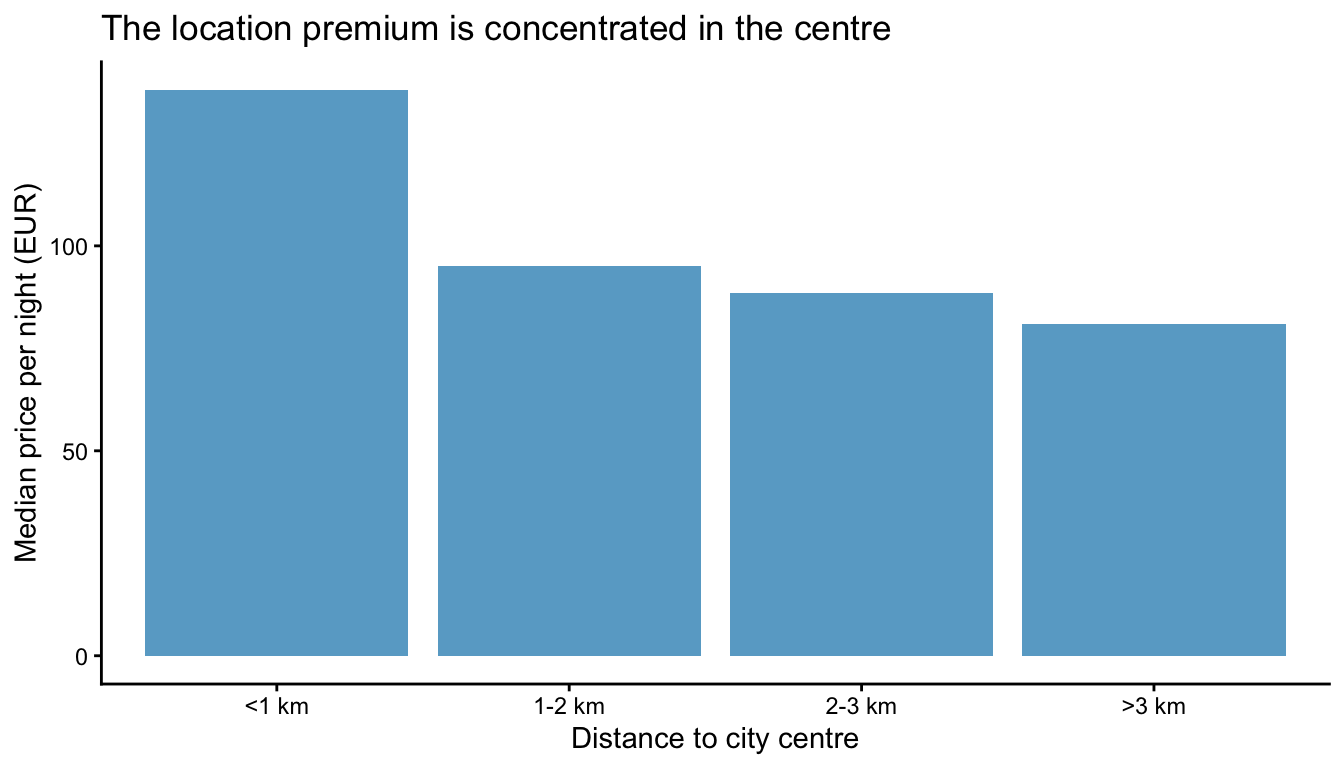
The label must start with fig- for a figure and tbl- for a table. That prefix is how Quarto knows what kind of thing it is numbering. Then @fig-bands anywhere in the text becomes a live, correctly numbered reference: Figure 1 and Table 2 were both produced above.
WarningThe three ways this goes wrong
- No caption. A figure without
fig-capis not registered as a figure, so the reference renders as?fig-bands— see Section 10. - Wrong prefix.
#| label: bandswill not work. It has to befig-bands. - A table made with
flextable. Usetbl-capin the chunk options, as in Table 2 above. Do not also pass a caption toflextable()— you get two.
8 Citing your sources
Citations work the same way as everything else: a key, resolved when the document is built.
The file references.bib holds entries like this one:
@book{bekes2021data,
  title     = {Data Analysis for Business, Economics, and Policy},
  author    = {Békés, Gábor and Kézdi, Gábor},
  year      = {2021},
  publisher = {Cambridge University Press}
}
Point the YAML at the file with bibliography: references.bib, then write [@bekes2021data] in the text. It renders as (Békés and Kézdi 2021), and the full entry appears in the bibliography at the end — formatted, alphabetised, and including only the works you actually cited.
TipGetting a
.bib entry without typing it
Google Scholar: click the quotation-mark icon under a result, then BibTeX. Copy the block into your references.bib. Zotero exports the same format for a whole library at once.
Do check what you paste — Scholar’s entries are often missing the publisher or have the year wrong. A citation manager is a labour-saving device, not a proofreader.
The data itself is a source and gets cited like one. Ours is the Vienna hotels dataset from Békés and Kézdi (2021).
TipUse a reference manager
If you do not already do so: I strongly suggest to use a reference manager to organizes your literature. It makes so many things easier, more efficient and less risky. My personal suggestion is Zotero: free, open source, platform-independent, and super versatile.
9 One source, many formats
Not demonstrated live — reading.
Everything above is independent of what the document is output as. The same .qmd can become several things; you add an entry under format: and the Render button grows a dropdown.
format: |
What you get |
|---|---|
html |
A web page. The default, and all Report 1 needs. |
pdf |
A typeset document for printing or handing in. Needs LaTeX, once. |
docx |
Word, for the co-author who insists. |
revealjs |
Slides — the session slides are a .qmd too. |
This document lists html and pdf, so quarto render produces both: same text, same numbers, same figures, typeset differently.
WarningThe two PDF surprises
PDF goes through LaTeX, which needs quarto install tinytex once — the optional task walks you through it, and the exemplary solution lists the differences in full. Two are worth knowing before you try:
- Collapsible callouts do not collapse. There is no clicking in a PDF, so everything you hid is simply visible. Do not hide anything you would not want read.
- Figures float. LaTeX puts a figure where it fits, not where you wrote it. Which is exactly why you write “see Figure 1” rather than “see the chart below”.
10 When it breaks
You will spend more of this course reading error messages than writing code, so it is worth knowing the regulars. These are the four you will most likely meet quite a few times:
R speaks your system’s language. If your R is set up in German you will see Objekt 'x' nicht gefunden where this document says object 'x' not found. Same error, same fix.
10.0.1 Objekt 'four_star' nicht gefunden
Error:
! Objekt 'four_star' nicht gefunden
The object exists in your console but not in your document. You created it interactively and never wrote the line down, so the fresh render session has never heard of it. Restart R and render — whatever breaks is what is missing from the file.
10.0.2 does not exist in current working directory
Error:
! 'data/hotels-vienna.csv' does not exist in current working directory:
  '…/applied-data-science/R'.
A path problem, and the message does you the favour of printing where it looked. Compare that folder with where the file actually is. Either the document is not where you think it is (Section 5), or you opened the .qmd instead of the project.
10.0.3 Validation of YAML front matter failed
ERROR: Validation of YAML front matter failed.
ERROR: In file report.qmd
(line 3, columns 1--7) Field "format" has empty value but it must instead be ...
Indentation or a missing colon. It names the line and even draws a ~ under the spot. The cause is almost always one of the two things in the YAML callout above: a key that should be nested is not, or a tab crept in.
10.0.4 ?fig-bands printed in the output
Not an error at all — the render succeeds and the wrong thing appears on the page. It means the cross-reference found nothing to point at: either the figure has no caption, or its label does not start with fig- / tbl-.
TipHow to read any of them
- The line number is where R noticed, not always where you broke it. A missing bracket three lines up surfaces here.
- The message names the chunk, if you labelled it. This is the real reason to label chunks.
- Read the first error only. Three errors are usually one cause; fix it and the other two vanish. Fixing them in order, from the bottom, is how people spend an afternoon on a typo.
- Restart R and render again after every fix, so you are not debugging a stale session.
11 One more thing: the boundary we chose
We have been treating “central” as within one kilometre. That was a choice. Nothing in the data required it. Watch what a different, equally defensible choice does:
only_hotels |>
  mutate(band_fine = cut(distance, c(-0.1, 0.5, 1, 2, 3, 100),
                         labels = c("<0.5 km", "0.5-1 km", "1-2 km",
                                    "2-3 km", ">3 km"))) |>
  filter(star_tier == "4 stars") |>
  group_by(band_fine, .drop = FALSE) |>
  summarise(n = n(), median_price = median(price), .groups = "drop") |>
ft()band_fine | n | median_price |
|---|---|---|
<0.5 km | 32 | 149.0 |
0.5-1 km | 31 | 128.0 |
1-2 km | 39 | 95.0 |
2-3 km | 12 | 88.5 |
>3 km | 11 | 81.0 |
The first kilometre was hiding a steep gradient inside itself. The 32 hotels within half a kilometre charge €149; the 31 between half a kilometre and a kilometre charge €128. The step between those two neighbouring bands is €21 — about half the €43 we reported a moment ago.
ImportantBoth numbers are correct, and that is the problem
Nobody made a mistake. €43 is the honest answer to “centre versus one-to-two kilometres out”. €21 is the honest answer to “innermost half-kilometre versus the next”. They are different questions, and the second one was invisible until we asked it.
A reader given only the headline number cannot tell which question was asked, let alone that a boundary was chosen at all. A reader given the document with its code can see the cut() call, disagree with it, change it, and re-render.
That is what reproducibility buys. Not a guarantee that the analysis is right — there is no such guarantee — but the ability for someone else to find out where it came from. The alternative is asking them to take your word for it.
12 What to take away
| Feature | What it buys you |
|---|---|
| YAML header | One place that controls the whole document |
| Markdown | Structure a reader can navigate — and a table of contents for free |
| Chunk options | Show the code, or hide it — per chunk |
| A labelled chunk | An error message that tells you where to look |
| A fresh session on render | Proof that nothing is hiding in your environment |
here() |
Paths that work on someone else’s machine |
Inline r code |
Numbers that cannot go stale |
label + caption |
Figures and tables you can refer to by name |
bibliography |
Citations formatted, and only the ones you used |
Several format: entries |
HTML now, PDF when you need it |
TipReading after this session
- Wickham et al. (2023), ch. 28 “Quarto” — the same ground, more slowly
- Quarto: Markdown basics
- Quarto: Figures and Cross-references
- Quarto: Citations
References
Békés, G. and Kézdi, G. (2021) Data analysis for business, economics, and policy, Cambridge: Cambridge University Press, available at https://gabors-data-analysis.com/.
Wickham, H., Çetinkaya-Rundel, M. and Grolemund, G. (2023) R for data science: Import, tidy, transform, visualize, and model data, 2nd edition., Beijing et al.: O’Reilly, available at https://r4ds.hadley.nz/.
Footnotes
As discussed below, you can also deviate from this practice and put your Quarto documents in a dedicated
reports/sub-directory. Useful if you have many Quarto files. Just make sure you sethere::i_am()correctly!↩︎