
cities <- hotels |>
group_by(city) |>
summarise(n = n(), median_price = median(price), .groups = "drop")
europe_median <- median(hotels$price)Exercise: make it board-ready, then catch the tricks
Session 6 — Applied Data Science 2026
NoteThe setting
The board liked your charts from last week — but they were charts for you. Now they want one they can put in front of their investors, and they want to know whether the charts a consultant sent them can be trusted.
Alone or in pairs. Two parts, as in the lecture: A and B, then C, a short exchange with a fellow student.
ImportantStart here
Install the one new package, if you have not already:
install.packages("gghighlight")Create session06.qmd in your project, copy both CSV files from the session page into data/, and start with this setup chunk:
```{r}
#| label: setup
#| include: false
library(tidyverse)
library(scales)
library(gghighlight)
library(here)

i_am("session06.qmd")

prices   <- read_csv(here("data", "hotels-europe_price.csv"))
features <- read_csv(here("data", "hotels-europe_features.csv"))

hotels <- prices |>
  filter(year == 2017, month == 11, weekend == 0) |>
  inner_join(features, by = "hotel_id") |>
  filter(city == city_actual, accommodation_type == "Hotel")

theme_board <- function(base_size = 13) {
  theme_minimal(base_size = base_size) +
    theme(
      plot.title            = element_text(face = "bold"),
      plot.title.position   = "plot",
      plot.caption          = element_text(colour = "grey45", hjust = 0),
      plot.caption.position = "plot",
      panel.grid.minor      = element_blank(),
      legend.position       = "top",
      legend.justification  = "left"
    )
}
```
Part A — Communication
A1 · The finding first
Board: “Where does Vienna stand among Europe’s cities — is it expensive?”
Before you write any code, compute what you need and write the one sentence your chart will say. It goes into the title later.
Where is Vienna’s median, compared with the European median? How many cities are more expensive?
A2 · The makeover
A colleague sent you this:
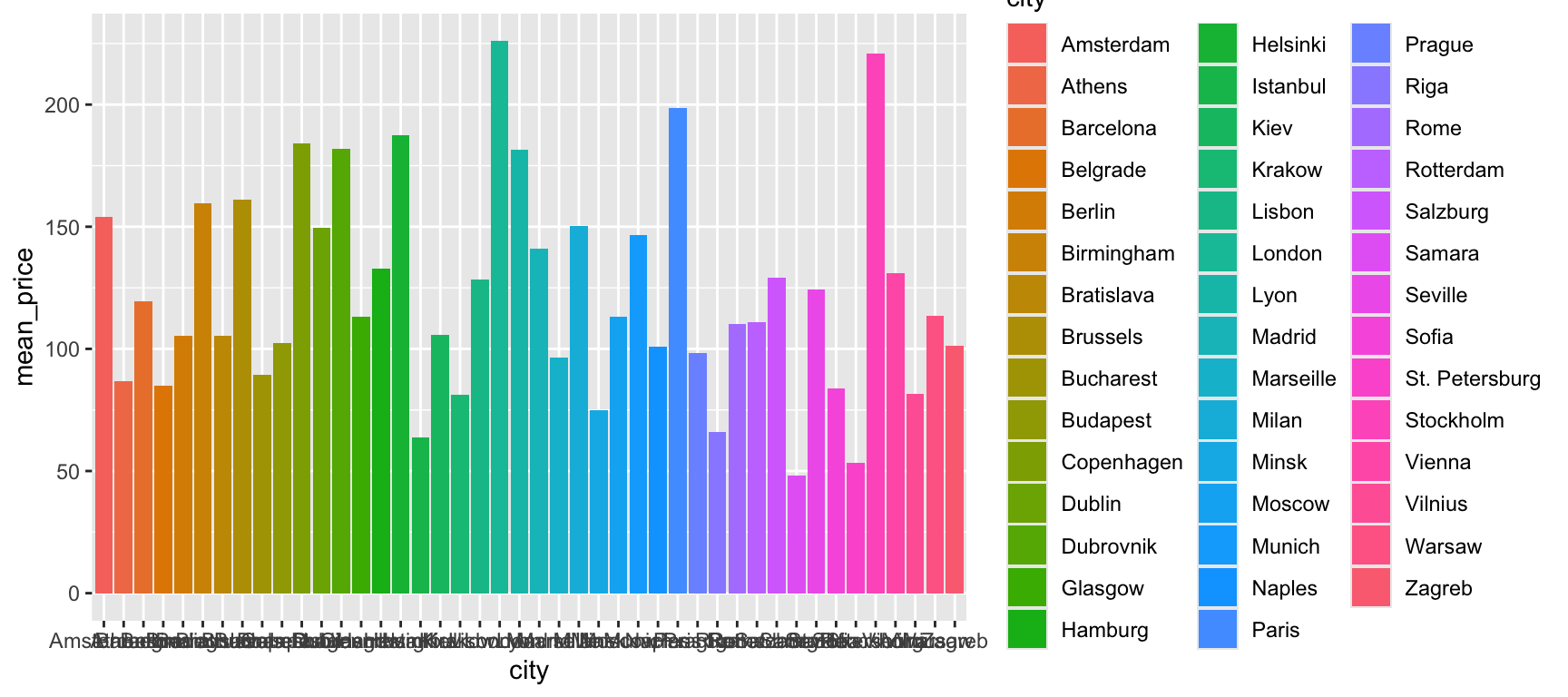
cities_mean <- hotels |>
  group_by(city) |>
  summarise(mean_price = mean(price))

ggplot(data = cities_mean, mapping = aes(x = city, y = mean_price, fill = city)) +
  geom_col()
Turn it into a chart that answers the board’s question in ten seconds. Work through these in order and render after each one:
- The right number: median, not mean (session 5).
- Readable: cities on the y axis, ordered by price.
- Emphasis: highlight Vienna with
gghighlight(); the other 43 cities stay, in grey. - A reference: a dashed line at the European median, labelled with
annotate("label")on a white background, so that no line runs through the text. - Say it: a title with your sentence from A1, a subtitle with what is measured, a caption with the source and
n. - House style:
+ theme_board().
TipHint for steps 2–4
ggplot(data = cities, mapping = aes(x = median_price,
                             y = fct_reorder(city, median_price))) +
  geom_col() +
  gghighlight(city == "Vienna") +
  geom_vline(xintercept = europe_median, linetype = "dashed") +
  annotate("label", x = europe_median, y = 3, label = "European median",
           hjust = -0.05, colour = "grey30", fill = "white", label.size = 0)
fill = city is gone: with gghighlight() the highlighted bar keeps its colour and you no longer need a legend. If you want a particular colour, put it in geom_col(fill = "#00395B").
TipHint for step 5
labs(title = …, subtitle = …, caption = …, x = NULL, y = NULL). For n in the caption, compute it and paste it in: caption = paste0("Data: Békés & Kézdi (2021). ", nrow(hotels), " hotels in ", nrow(cities), " cities.")
A3 · Colour that means something
Take the weekend chart from session 5 — four cities, one line each — and replace ggplot’s default colours with the colour-blind-safe Okabe–Ito palette:
okabe_ito <- unname(palette.colors(palette = "Okabe-Ito"))
# then: + scale_colour_manual(values = okabe_ito[2:5])
TipThe weekend chart from session 5
weekends <- prices |>
  filter(weekend == 1) |>
  inner_join(features, by = "hotel_id") |>
  filter(city == city_actual, accommodation_type == "Hotel",
         city %in% c("London", "Paris", "Rome", "Vienna")) |>
  group_by(city, year, month) |>
  summarise(n = n(), median_price = median(price), .groups = "drop") |>
  mutate(date = make_date(year, month))

ggplot(data = weekends, mapping = aes(x = date, y = median_price, colour = city)) +
  geom_line() +
  geom_point() +
  scale_x_date(date_breaks = "1 month", date_labels = "%b") +
  scale_y_continuous(labels = label_number(prefix = "€")) +
  labs(x = NULL, y = NULL, colour = NULL) +
  theme_board()
Is colour doing a categorical, sequential or diverging job here?
Part B — Deception
B1 · Spot the trick
A consultant sent the board these four charts. Every number on them is correct. For each one, write down:
- (a) what the chart wants you to believe,
- (b) the trick — name it with the checklist from the lecture,
- (c) what an honest version would show.
Chart 1
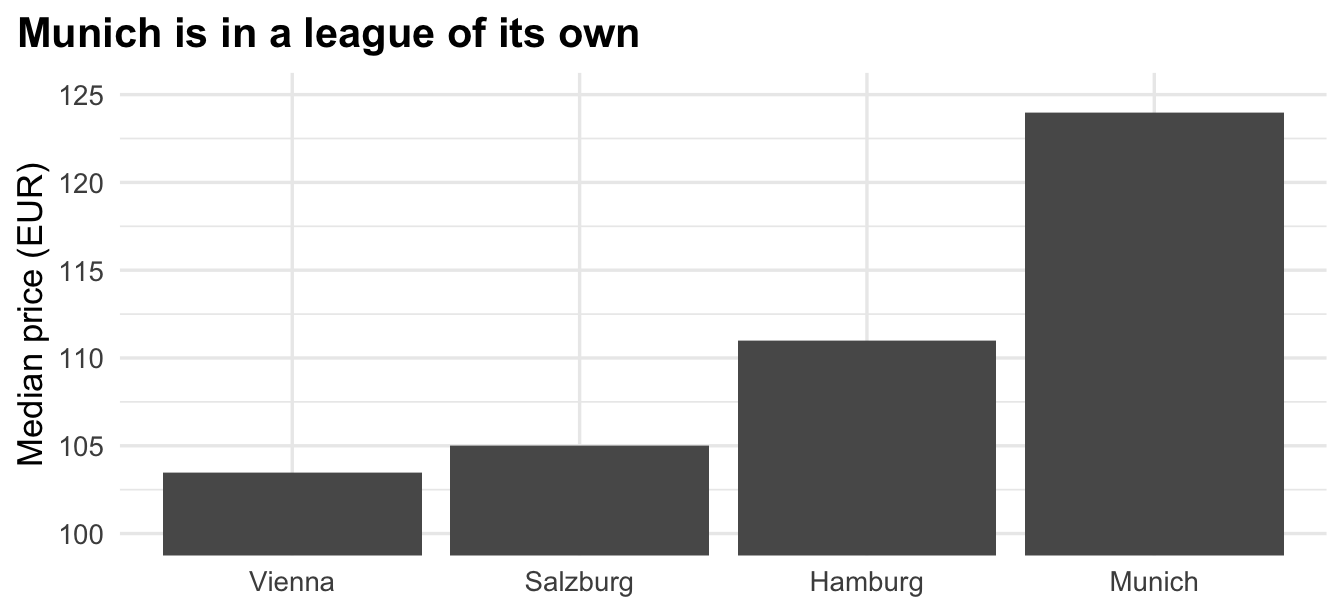
Chart 2
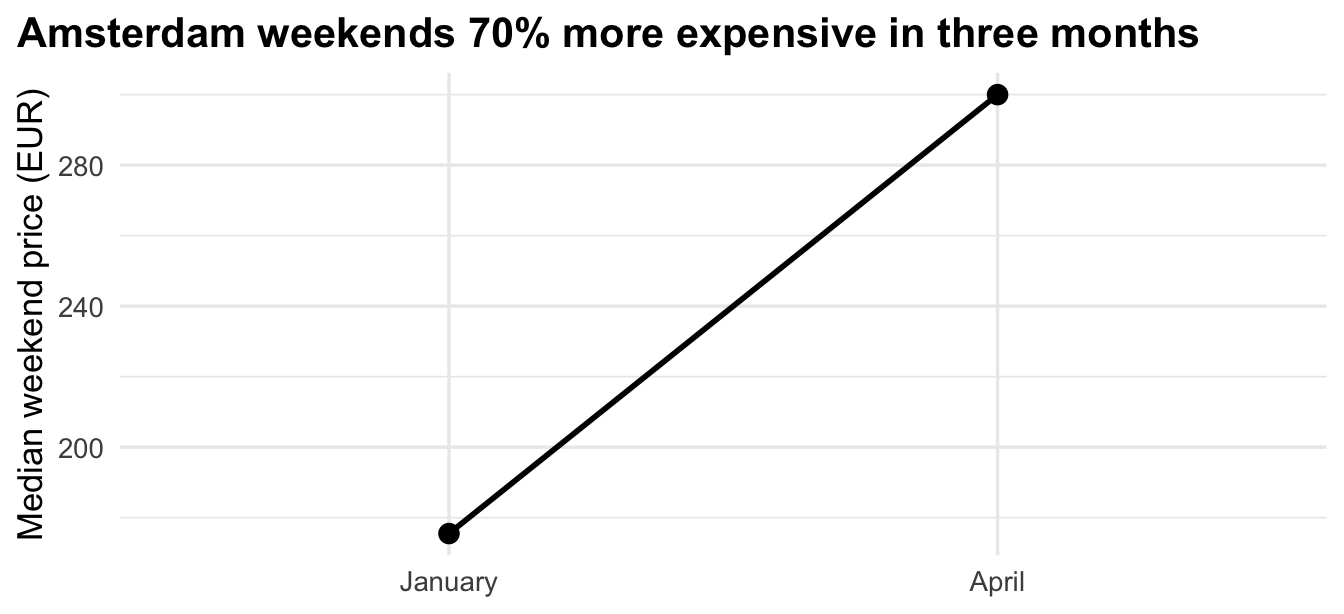
Chart 3
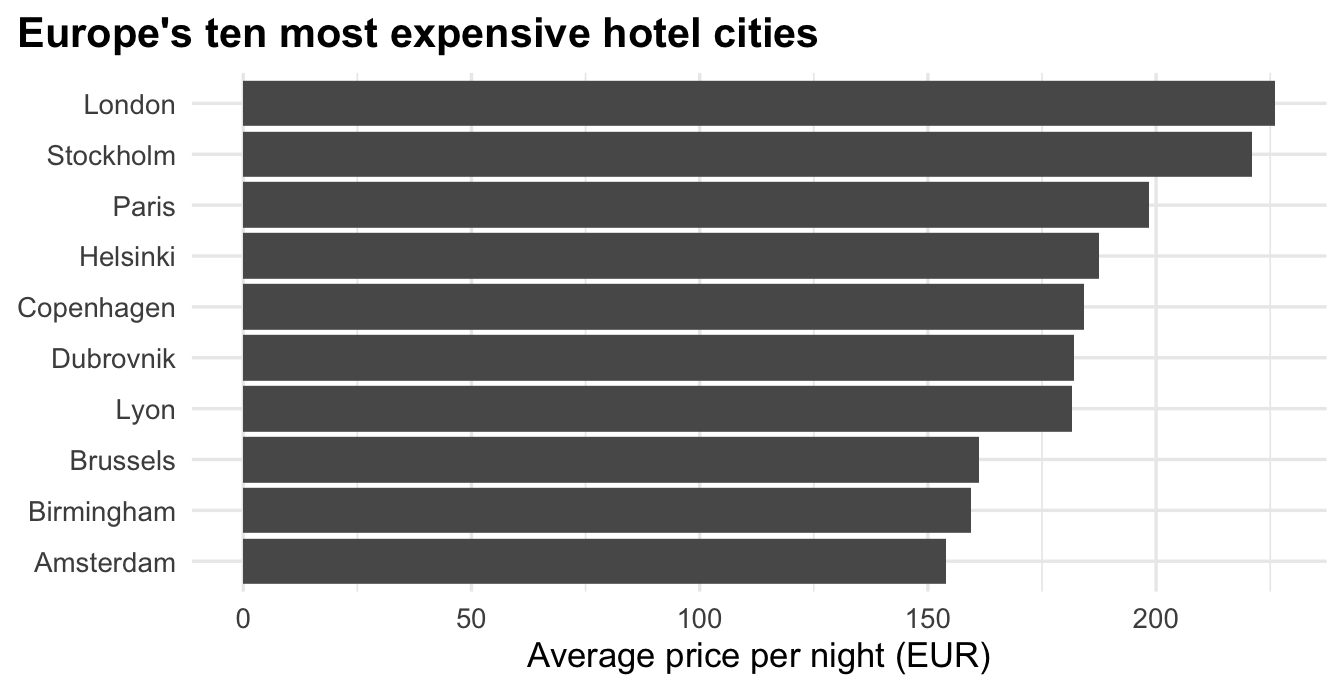
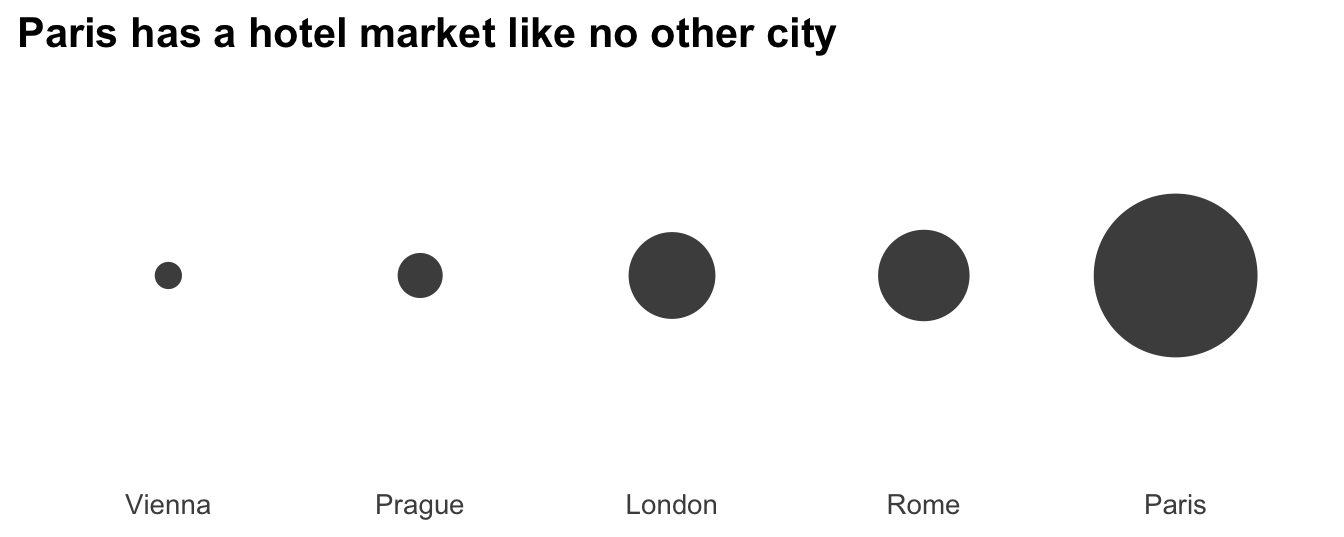
Chart 4
TipThe checklist, again
Claim · Baseline · Window · Axes · n · Summary · Encoding · Source
B2 · Fix two of them
Pick two of the four and build the honest version in your document. Give each the title it can actually support.
TipWhat you need for each
- Chart 1: the median prices of the four cities; bars from zero.
- Chart 2: Amsterdam’s median weekend price for every month in the data (session 5, Q6).
- Chart 3: the median, and
n— for example in the city label:paste0(city, " (n = ", n, ")"). - Chart 4: the number of hotels per city, as bars or dots.
Part C — The checklist on a fellow student’s chart
Swap laptops with a fellow student. Run the eight checklist questions over their A2 chart. Write down the one thing you would change, and tell them.
The checklist
Before you hand in any chart — in Report 2 and after:
If you finish early
a) Diverging instead of highlighting
Redraw A2 as the difference from the European median, in percent, with scale_fill_gradient2(): blue below, red above, grey in the middle. Which version answers the board’s question better?
b) Make your own trick
Build one misleading chart from this data — honest numbers, one bad choice. Show it to a fellow student and let them find the trick.
c) Save it
Store your A2 chart as an object, a2 <- ggplot(…) + …, and save it twice:
- as a PDF, 8 × 4.5 inches — the default for a report;
- as a PNG for a PowerPoint deck: same size,
dpi = 300,bg = "white".
Open both files and zoom in. Which one stays sharp? Does the text size still work at 8 × 4.5 inches — and if not, what do you change?
d) Two series, one axis
Lecture B3 put Vienna’s median weekend price and the number of hotels in the data on two y axes — and showed that the second axis can tell any story. Build the honest version: set both series to 100 in November 2017 and show the relative change from there, on one axis.
vienna_supply <- prices |>
  filter(weekend == 1) |>
  inner_join(features, by = "hotel_id") |>
  filter(city == "Vienna", city_actual == "Vienna", accommodation_type == "Hotel") |>
  group_by(year, month) |>
  summarise(n = n(), median_price = median(price), .groups = "drop") |>
  mutate(date = make_date(year, month))
What does the chart show in January — and what does its title not allow you to say?