
library(tidyverse)
library(flextable)

hotels <- read_csv("data/hotels-vienna.csv")Exemplary solution — Session 1
Applied Data Science 2026
This is one potential answer, not the answer. Your chart will look different, and that is fine — what matters is that it answers a question, that you interrogated it, and that the document renders.
NoteNotice what this document never does
Every number in the prose below is produced by inline R code, written as `r median(hotels$price)` rather than typed out. If the data changed tomorrow, the sentences would update themselves.
Typing results by hand is the most common way a report ends up contradicting its own tables. Get into this habit now — it is expected in your reports. But we will also discuss it in more detail in session 3.
1 Part 2 — Getting our bearings
1.1 a) Size of the dataset
nrow(hotels)[1] 428ncol(hotels)[1] 24The dataset covers 428 hotels described by 24 variables.
1.2 b) Prices
summary(hotels$price) Min. 1st Qu. Median Mean 3rd Qu. Max.
27.0 83.0 109.5 131.4 146.0 1012.0 The median room costs €109.50 per night and the cheapest is €27. The mean (€131.37) sits well above the median, so the distribution is right-skewed: a small number of expensive hotels pull the average up. For prices the median is the more honest summary.
1.3 c) Types of accommodation
hotels |>
  count(accommodation_type, sort = TRUE) |>
  ft()
accommodation_type | n |
|---|---|
Hotel | 264 |
Apartment | 124 |
Pension | 16 |
Guest House | 8 |
Hostel | 6 |
Apart-hotel | 4 |
Bed and breakfast | 4 |
Vacation home Condo | 2 |
Despite the name, the dataset is not only hotels: 264 hotels, but also 124 apartments and a scattering of pensions, guest houses and hostels. That will matter in Part 5.
2 Part 3 — The chart
Question: do guests pay more for places they rate highly?
ggplot(hotels, aes(x = rating, y = price)) +
  geom_point(alpha = 0.5) +
  geom_smooth(method = "loess", formula = y ~ x, colour = "#E65032") +
  labs(
    x = "Guest rating (out of 5)",
    y = "Price per night (EUR)",
    title = "Above a rating of 4, price climbs steeply"
  ) +
  theme_classic()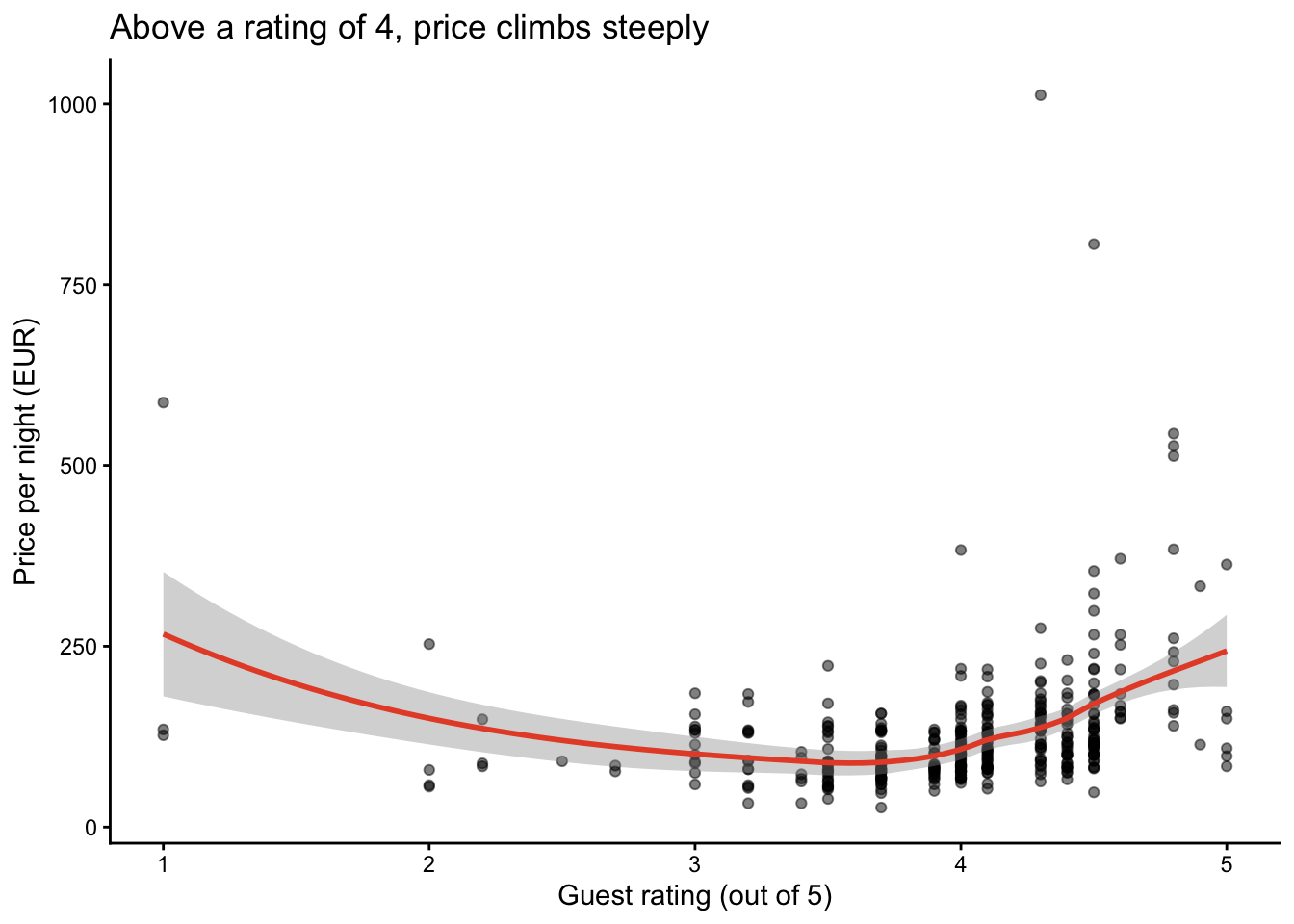
TipWhy the smoother is helpful
With 400-odd overlapping points, the eye cannot judge the trend — and it is especially bad at seeing where a relationship changes. geom_smooth() draws the average relationship through the cloud, and the flat-then-rising shape is the whole finding.
The grey band is the uncertainty around that line. Note how it widens at the far right, where there are only a handful of hotels: the smoother is least trustworthy exactly where the effect looks most dramatic. Read the band, not just the line.
TipIf you chose a violin or a boxplot instead
Both are useful to answer the question “do more stars cost more?”.
A boxplot gives you five numbers. A violin draws the whole shape of the distribution, so you can see whether prices pile up at the bottom, spread evenly, or split into two groups — and for a question about pricing, the shape is usually the interesting part. The nicest version puts a small boxplot inside the violin, so you get the shape and the median at once:
ggplot(hotels, aes(x = factor(stars), y = price)) +
  geom_violin(fill = "#69AACD", colour = NA) +
  geom_boxplot(width = 0.12, outlier.size = 0.6) +
  labs(x = "Stars", y = "Price per night (EUR)",
       title = "Price rises with stars — but the spread rises faster") +
  theme_classic()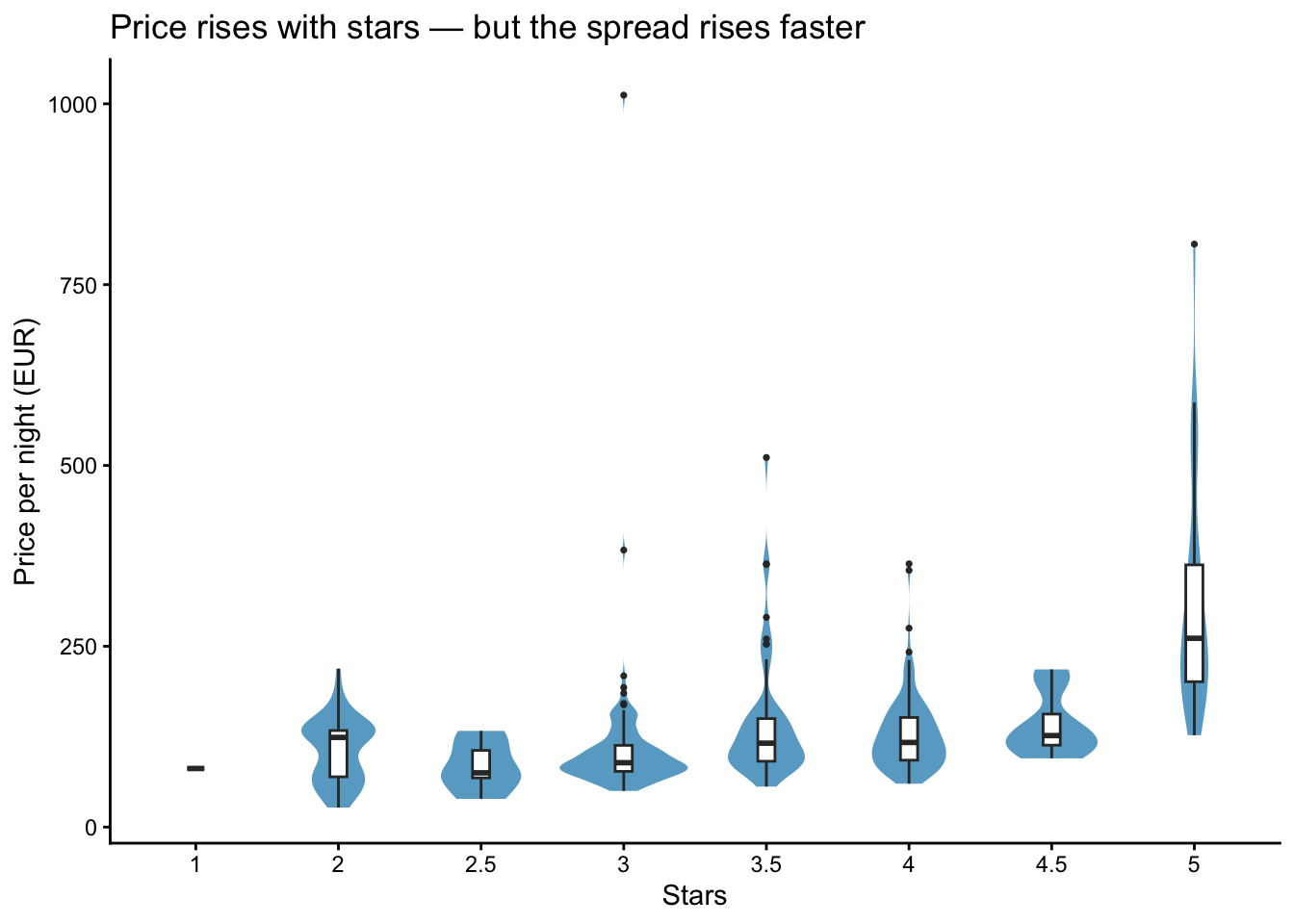
WarningA violin will draw you a shape out of almost nothing — count first
This is the habit the whole course is about: a violin invents a smooth curve even when there are three observations behind it. Before plotting by group, count the groups.
count(hotels, stars) |> ft()stars | n |
|---|---|
1.0 | 1 |
2.0 | 47 |
2.5 | 5 |
3.0 | 140 |
3.5 | 57 |
4.0 | 143 |
4.5 | 8 |
5.0 | 27 |
count(hotels, accommodation_type, sort = TRUE) |> ft()accommodation_type | n |
|---|---|
Hotel | 264 |
Apartment | 124 |
Pension | 16 |
Guest House | 8 |
Hostel | 6 |
Apart-hotel | 4 |
Bed and breakfast | 4 |
Vacation home Condo | 2 |
Several groups here are far too small to read a distribution from. Only 1 hotel carries one star and 5 carry 2.5; on the other axis there are just 2 “Vacation home Condo” listings. The violins for those are decoration, not evidence.
Two honest ways out. Keep only the well-populated groups:
hotels |> filter(accommodation_type %in% c("Hotel", "Apartment"))Or show the observations themselves, which cannot pretend there are more of them than there are:
geom_jitter(width = 0.15, alpha = 0.5)Noticing this before you plot is the point. It comes back in session 2.
NoteTitles are underestimated
"Price by star rating" describes the axes, which the reader can already see. A title should state the finding, so that someone who reads nothing else still leaves with the point: "Five-star hotels cost three times the city median".
Both charts in this document do that — “Above a rating of 4, price climbs steeply” and, below, “The rating premium is a hotel phenomenon”. It is a cheape improvement you can make to any chart, and it is expected in your reports. You can read more about titles in The Neglected Detail, a short blog post worth the five minutes (Holtz 2025).
3 Part 4 — Write-up
What it shows. Below a guest rating of about 4 there is barely any relationship — prices sit in a broad band around €89 regardless of rating. Above 4 the price climbs sharply, reaching a median of €184 for the best-rated places.
rated |>
  mutate(band = cut(rating, c(0, 3.5, 4, 4.5, 5))) |>
  group_by(band) |>
  summarise(n = n(), median_price = median(price), .groups = "drop") |>
  ft()
band | n | median_price |
|---|---|---|
(0,3.5] | 75 | 89.0 |
(3.5,4] | 131 | 89.0 |
(4,4.5] | 158 | 120.5 |
(4.5,5] | 29 | 184.0 |
What surprised me. I expected a steady climb across the whole range. Instead the bottom half is flat: a 3.2 rating and a 3.9 rating command much the same price.
What could make it misleading. Three things.
- 35 hotels have no rating at all and vanish silently from the chart. If unrated places are systematically cheap, the picture is distorted.
sum(is.na(hotels$rating))[1] 35The €1,012 three-star outlier is still in there, stretching the y-axis and flattening everything else.
Ratings are not comparable across types. A hostel rated 4.5 and a five-star hotel rated 4.5 are not being judged on the same scale, but the chart treats them as one population.
4 Part 5 — If you finish early
4.1 a) Splitting the chart by a third variable
hotels |>
  filter(accommodation_type %in% c("Hotel", "Apartment")) |>
  ggplot(aes(x = rating, y = price)) +
  geom_point(alpha = 0.5) +
  facet_wrap(~ accommodation_type) +
  labs(
    x = "Guest rating (out of 5)",
    y = "Price per night (EUR)",
    title = "The rating premium is a hotel phenomenon"
  ) +
  theme_classic()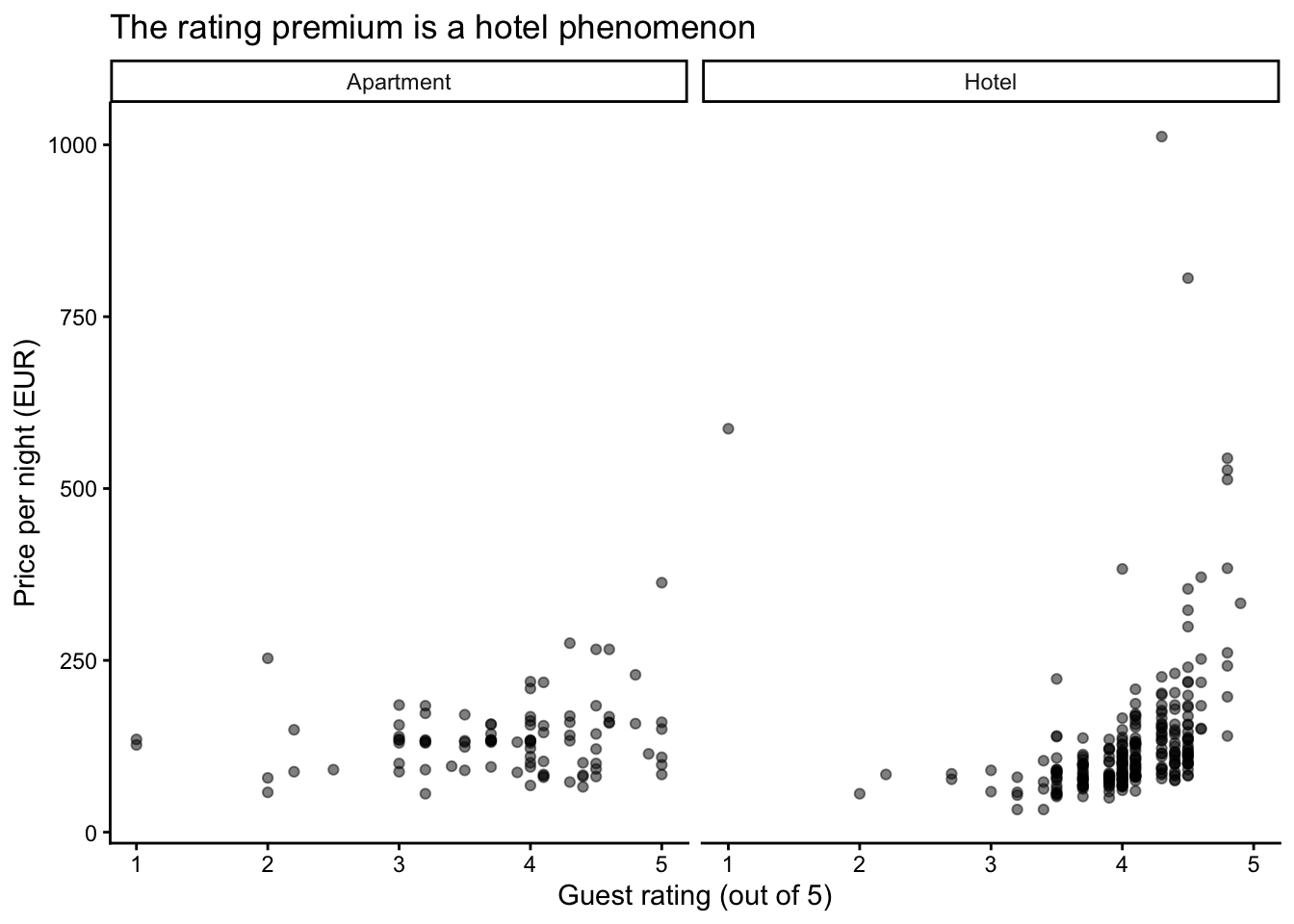
I kept only hotels and apartments: the other six categories have between two and sixteen properties each, and a panel drawn from two points is not worth looking at.
Splitting the chart changes the story. Among hotels the steep climb above a rating of 4 is clearly there. Among apartments it is much flatter — and the apartment panel is also visibly emptier on the left, because most of the missing ratings are apartments.
TipWhat faceting is for
facet_wrap() is the fastest way to ask “does this pattern hold in every subgroup, or is it driven by one of them?” It is often the difference between a finding and an artefact, and it costs one line.
4.2 b) Removing the problems
hotels_clean <- hotels |>
  filter(city_actual == "Vienna", price < 1000)

nrow(hotels)
[1] 428nrow(hotels_clean)[1] 41711 rows go: 10 hotels that are not in Vienna, plus the €1,012 anomaly. The finding survives — the median is essentially unchanged at €110 — but the chart is much easier to read once the y-axis is not being stretched by a single point.
4.3 c) The two-star puzzle
hotels_clean |>
  group_by(stars) |>
  summarise(n = n(), median_price = median(price), .groups = "drop") |>
  ft()
stars | n | median_price |
|---|---|---|
1.0 | 1 | 81.0 |
2.0 | 47 | 124.0 |
2.5 | 5 | 75.0 |
3.0 | 134 | 88.5 |
3.5 | 57 | 116.0 |
4.0 | 138 | 116.5 |
4.5 | 8 | 126.5 |
5.0 | 27 | 261.0 |
Two-star places have a median price of €124 against €88.50 for three-star ones. Taken at face value this says a worse rating earns more money, which cannot be right.
The nudge gives it away:
hotels_clean |>
  filter(stars == 2) |>
  count(accommodation_type, sort = TRUE) |>
  ft()
accommodation_type | n |
|---|---|
Apartment | 25 |
Hotel | 14 |
Hostel | 6 |
Pension | 2 |
Most two-star listings are not hotels at all — 25 of the 47 are apartments, against only 14 hotels. Apartments are priced per unit rather than per room, so they are expensive irrespective of their star rating, and they drag the two-star median upwards.
Compare like with like, and the anomaly disappears:
hotels_clean |>
  filter(accommodation_type == "Hotel") |>
  group_by(stars) |>
  summarise(n = n(), median_price = median(price), .groups = "drop") |>
  ft()
stars | n | median_price |
|---|---|---|
1.0 | 1 | 81.0 |
2.0 | 14 | 66.5 |
2.5 | 2 | 87.0 |
3.0 | 82 | 84.0 |
3.5 | 14 | 100.0 |
4.0 | 111 | 117.0 |
4.5 | 6 | 126.5 |
5.0 | 23 | 261.0 |
Among hotels alone the ranking is exactly what you would expect: €66.50 for two stars, €84 for three, €117 for four, €261 for five.
ImportantThe lesson a.k.a. the point of the whole course
The first table was not wrong. It answered a different question from the one we asked. We asked “what is a star worth?” and it answered “what do differently-starred listings cost?” — and those differ because accommodation type is tangled up with star rating.
Comparing groups that differ in more than one respect is the most common way to reach a confident wrong conclusion. It happens in the first ten minutes of looking at almost any real dataset.
Filtering to one accommodation type is the crude fix. Doing it properly, for every variable at once, is what regression is for — and why we come back to this in session 8.
NoteA second problem with this table, which we fix next week
Look at the star column again. There are half stars, so the data splits into eight groups — and some of them hold two or five properties. Worse, stars is stored as a plain number, which means R would happily report a mean star rating of 3.47, a rating no hotel can have.
In session 2 we round the half stars into five tiers and turn them into a factor, R’s type for a proper category. The two-star puzzle above comes out exactly the same way — but every group is then big enough to talk about.
For today, leave stars as it is. Seeing the mess is the point.
TipDo not worry if this went over your head
Nobody is expected to have seen this in week one. Notice the pattern, remember that it was strange, and we will come back to it with the right tool.
4.4 d) What #| echo: false changes
Adding #| echo: false to the top of a chunk keeps the output and hides the code:
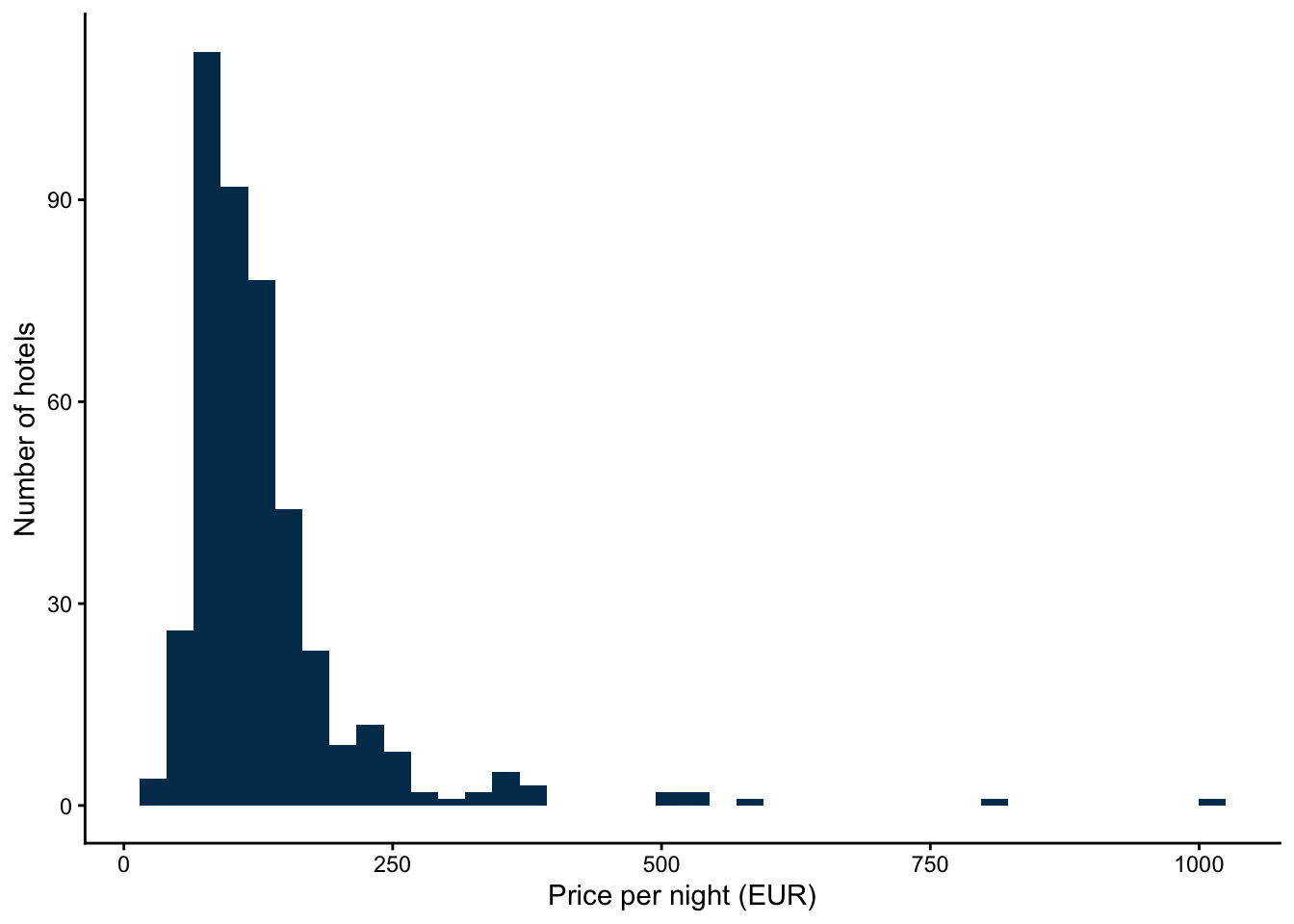
The chart above was produced by a chunk you cannot see. The code still ran — the figure proves it — it simply is not printed.
NoteWhen to hide code, and when not to
| Audience | Setting |
|---|---|
| A manager who wants the answer | echo: false — they do not read R |
| A colleague who has to check your work | echo: true — the code is the argument |
| These reports | echo: true, unless a chunk is pure housekeeping |
Do not confuse it with #| eval: false, which is the opposite: it shows the code and does not run it. A chunk with eval: false produces no output at all.
NoteOne more thing that histogram is telling you, which we fix in session 5
Look at its shape. Almost every hotel is bunched against the left edge, and a handful stretch the axis all the way out to €1,012. That is the same right skew that put the mean (€131.37) so far above the median (€109.50) back in Part 2 — seen from the side this time.
Prices behave like this almost everywhere: a room can be ten times the average, but never a tenth of it. The standard fix is to put price on a logarithmic scale, which spreads out the crowded part and pulls the long tail in. It is one line:
scale_x_log10()We are not using it today, deliberately. On a log scale the €1,012 hotel stops looking like a mistake and starts looking like an ordinary expensive one — and finding that mistake was the whole point of this session.
Session 5 introduces it properly, on data where a linear axis does not merely look awkward but fails outright. For today, leave the axis as it is. Seeing the skew is the point.
References
Holtz, Y. (2025) The neglected detail, 6 December 2025, available at https://www.yan-holtz.com/posts/the-neglected-detail.html (accessed September 2026).