2 + 2[1] 4Session 1 — Applied Data Science 2026
This is the document we build together in the session, written from an empty file step by step. Use it afterwards as a model for your own reports.
Before writing a single line of code, give your work a home.
applied-data-sciencedata, R and Outputhotels-vienna.csv from the session page and save it into data/You should end up with this:
applied-data-science/
├── applied-data-science.Rproj   ← created for you; never edit it
├── data/                        ← raw data, read-only. Never edit by hand.
│   └── hotels-vienna.csv
├── R/                           ← .R scripts (we start using this in session 2)
├── Output/                      ← rendered reports, exported figures and tables
└── session01.qmd                ← the document we are about to create
The rule for each folder: data/ goes in and never changes; R/ holds reusable code; Output/ holds anything produced by your code, and should be safe to delete because you can always regenerate it.
I keep one project for the whole course and you are welcome to copy that. One project per session works just as well, and nothing in this course depends on which you pick. Reports are the exception — each report gets its own project, for reasons we come to in session 3.
Two things matter whichever way you go:
.qmd you are working on sits at the top of the project, with data/ beside it. Every session reads its data as data/something.csv, so if you bury the document one folder deeper, the path stops working. Session 3 shows the proper fix for that; until then, keep it flat.session01.qmd, session02.qmd, and so on. By December there will be a dozen of them, and three files called Untitled1.qmd will tell you nothing.RStudio restarts and you are now inside the project. Two things changed: the top-right corner shows the project name, and R’s working directory is the project folder.
That second one matters more than it looks. It means you can write data/hotels-vienna.csv instead of C:/Users/yourname/Desktop/stuff/final_v3/data/hotels-vienna.csv — and your code will still work on someone else’s computer.
Never write a file path that starts with C:/ or /Users/. If you do, your analysis only runs on your machine, which means it is not reproducible, which means it is not evidence.
Type this in the Console (bottom left) and press Enter:
2 + 2[1] 4R answers. Now something more useful — store a value:
revenue <- 12500
costs <- 9800
Nothing is printed. Look at the Environment pane (top right): the two objects are now there. Ask for them:
revenue - costs[1] 2700The arrow <- is how you name things. Read it as “gets”: revenue gets 12500.
Everything you type in the console is gone when you close RStudio. If you want to keep it, write in a file instead!
File → New File → Quarto Document. Give it a title, choose HTML, click Create. Save it as session01.qmd.
RStudio gives you a file with three kinds of content:
| Part | What it is | How to spot it |
|---|---|---|
| YAML header | Settings for the whole document | Between the two --- lines at the top |
| Text | Your prose, in Markdown | Plain writing |
| Code chunks | R code that gets run | Between ```{r} and ``` |
Ours looks like this:
---
title: "What does a hotel room cost in Vienna?"
author: "Your Name"
date: today
format: html
---
That is the minimum. format: pdf would produce a PDF instead.
Markdown is plain text with a few marks:
| You write | You get |
|---|---|
# Heading |
A big heading |
## Subheading |
A smaller one |
**bold** |
bold |
*italic* |
italic |
- item |
a bullet point |
That is genuinely most of it.
Insert a chunk with Ctrl/Cmd + Alt + I, or type it out:
library(tidyverse)
library(flextable)
This loads the tidyverse, a collection of packages we use all semester. It also loads flextable, which makes tables look nicer in a report.
A package is installed once, with install.packages("tidyverse"). It is loaded every session, with library(tidyverse). Installing is buying the book; loading is taking it off the shelf.
hotels <- read_csv("data/hotels-vienna.csv")We will take read_csv() apart properly next week. For today: it reads a comma-separated file and gives you a table.
428 hotels in Vienna, price for one night in November 2017. From Békés & Kézdi (2021), Data Analysis for Business, Economics and Policy, licensed CC BY-NC-SA 4.0. Each row is one hotel.
Three questions to ask of any new dataset.
How big is it?
nrow(hotels)[1] 428ncol(hotels)[1] 24What is in it?
names(hotels) [1] "country" "city_actual" "rating_count"
[4] "center1label" "center2label" "neighbourhood"
[7] "price" "city" "stars"
[10] "ratingta" "ratingta_count" "scarce_room"
[13] "hotel_id" "offer" "offer_cat"
[16] "year" "month" "weekend"
[19] "holiday" "distance" "distance_alter"
[22] "accommodation_type" "nnights" "rating" What do the numbers look like?
summary(hotels$price) Min. 1st Qu. Median Mean 3rd Qu. Max.
27.0 83.0 109.5 131.4 146.0 1012.0 The $ picks one column out of the table, so hotels$price is the price column on its own.
Median €109.50, mean €131.40. The mean sits well above the median, so the distribution is right-skewed — a few very expensive hotels pull the average up. For prices, incomes and firm sizes this is the norm, and the median is the more honest summary.
Also note the maximum: €1012. Hold that thought.
ggplot(
  data = hotels,
  mapping = aes(x = distance, y = price)
) +
  geom_point(alpha = 0.5) +
  theme_classic()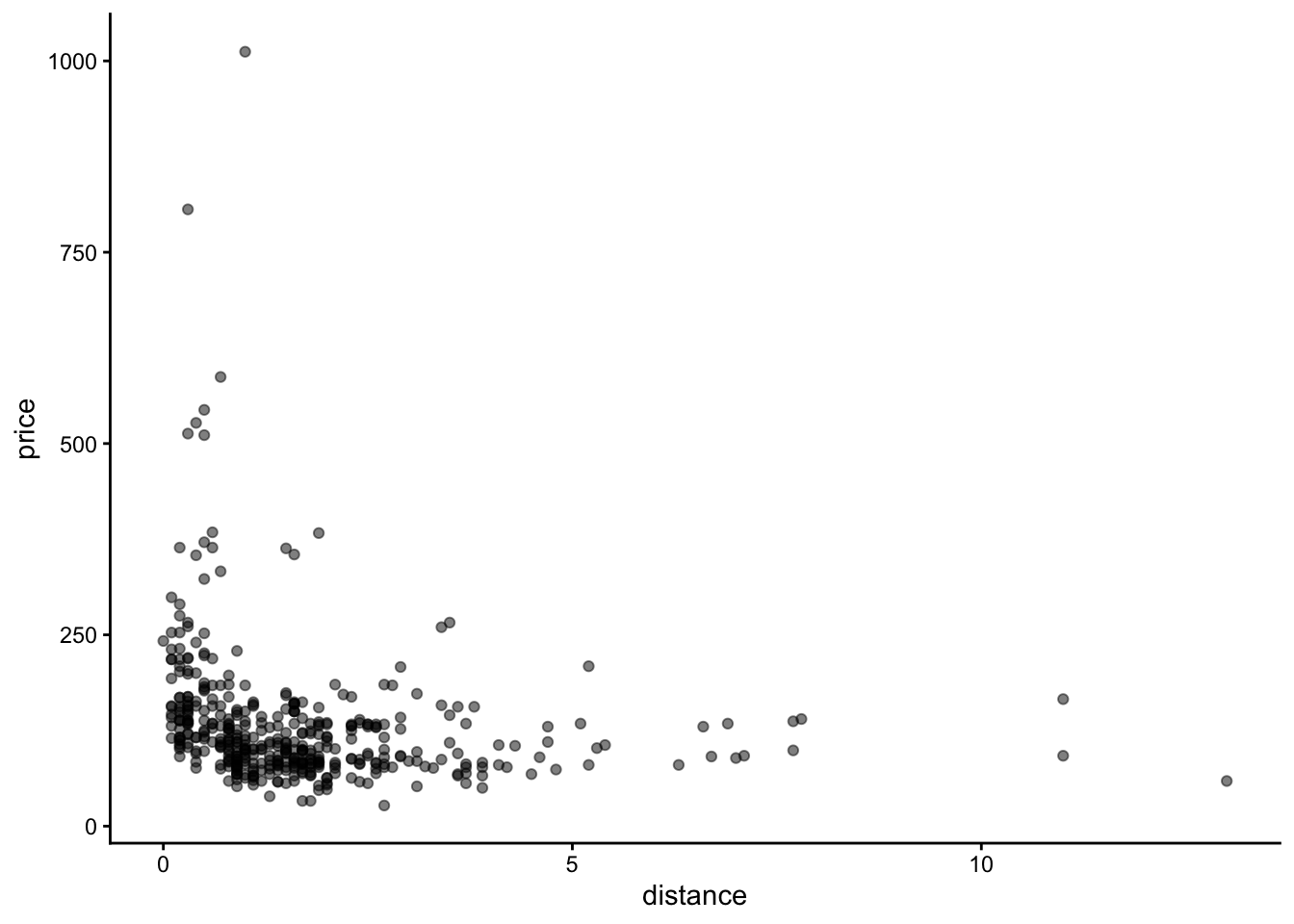
Three things are going on, and they are the same three things in every ggplot:
data = — which tablemapping = aes(...) — which column goes on which axisgeom_*() — how to draw italpha = 0.5 makes points semi-transparent so we can see where they overlap.
theme_classic() is one line making the plot look more decent.
The headline is unsurprising: closer to the centre, more expensive. The interesting part is everything else.
Who is that hotel at €1012?
hotels |>
  filter(price > 500) |>
  select(price, stars, distance, accommodation_type, neighbourhood) |>
  flextable() |>
  theme_vanilla()
price | stars | distance | accommodation_type | neighbourhood |
|---|---|---|---|---|
513 | 5.0 | 0.3 | Hotel | Innere Stadt |
806 | 5.0 | 0.3 | Hotel | Innere Stadt |
544 | 5.0 | 0.5 | Hotel | Innere Stadt |
511 | 3.5 | 0.5 | Apartment | Innere Stadt |
527 | 5.0 | 0.4 | Hotel | Kaerntner Strasse |
587 | 5.0 | 0.7 | Hotel | Leopoldstadt |
1,012 | 3.0 | 1.0 | Hotel | Neubau |
A three-star hotel at €1012, when the most expensive five-stars are around €800. That is almost certainly a data-entry error, and we found it by looking at a picture rather than by running a test.
And who is 13 km out?
hotels |>
  filter(distance > 6) |>
  select(city_actual, price, distance, stars) |>
  flextable() |>
  theme_vanilla()
city_actual | price | distance | stars |
|---|---|---|---|
Fischamend | 59 | 13.0 | 3 |
Schwechat | 92 | 11.0 | 3 |
Schwechat | 166 | 11.0 | 4 |
Schwechat | 137 | 7.7 | 4 |
Schwechat | 99 | 7.7 | 3 |
Schwechat | 140 | 7.8 | 4 |
Schwechat | 80 | 6.3 | 3 |
Schwechat | 91 | 6.7 | 3 |
Vienna | 134 | 6.9 | 3 |
Vienna | 130 | 6.6 | 3 |
Voesendorf | 89 | 7.0 | 4 |
Voesendorf | 92 | 7.1 | 4 |
Twelve properties sit more than 6 km out — and for ten of them the city_actual column does not say Vienna. Schwechat is the airport town, Fischamend and Voesendorf are neighbours. “Distance to the city centre” means something quite different for an airport hotel, so those ten should come out of most analyses.
The other two genuinely are in Vienna, just far from the middle. They stay.
It would be easy to write filter(distance < 6) and move on. That would also throw away two perfectly good Vienna hotels, and it would silently break the moment someone adds a hotel 6.5 km out in the 22nd district.
The thing we actually object to is that ten properties are not in the city, so that is what we should filter on:
hotels |>
  filter(city_actual != "Vienna") |>
  nrow()
[1] 10Nobody told us the data had these problems. We found them in the first five minutes by plotting it and asking who the odd points were. Do this every time, before you model anything.
Colour by star rating:
ggplot(
  data = hotels,
  mapping = aes(x = distance, y = price, colour = factor(stars))
) +
  geom_point(alpha = 0.7) +
  labs(
    x = "Distance to city centre (km)",
    y = "Price per night (EUR)",
    colour = "Stars",
    title = "Central hotels cost more — but they are also fancier"
  ) +
  theme_classic()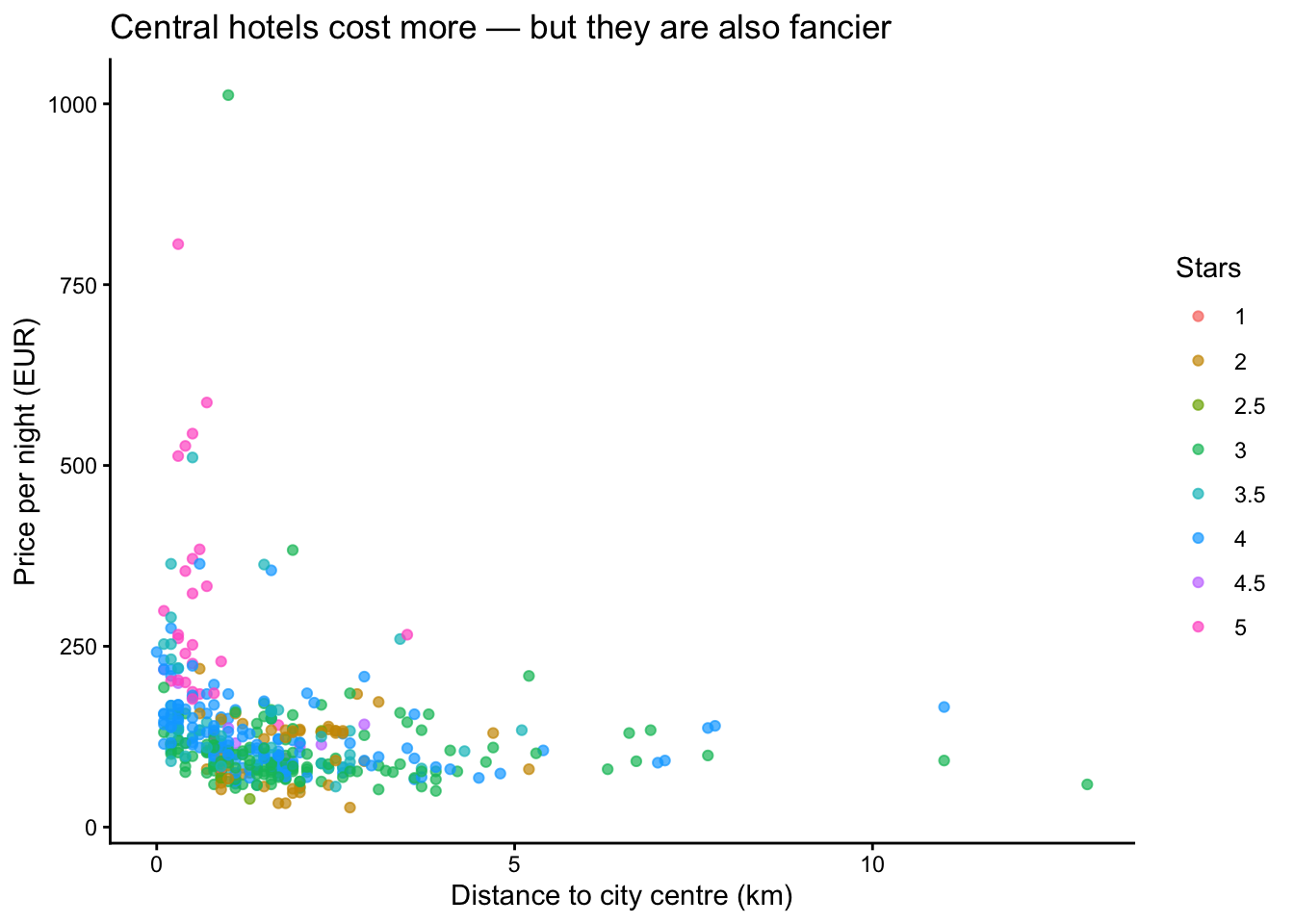
Look at the colours near the left edge. The expensive central hotels are also the high-star ones.
Is the centre expensive because it is central, or because that is where the good hotels happen to be?
The chart cannot tell us. Session 2 gets us most of the way, and session 8 finishes the job.
Click Render (or Ctrl/Cmd + Shift + K).
Quarto runs every chunk from top to bottom in a fresh R session, and writes an HTML file next to your .qmd.
Rendering starts from nothing. If your code only works because you typed something into the console an hour ago, it will fail here.
This is a feature. It is the machine checking that your analysis actually reproduces. It is also exactly what the automated check on your reports will do.
Options go at the top of a chunk, after #|:
| Option | Effect |
|---|---|
#| echo: false |
Run the code, hide it — show only the output |
#| eval: false |
Show the code, do not run it |
#| warning: false |
Suppress warning messages |
#| fig-cap: "..." |
Add a caption to a figure |
#| label: fig-name |
Name the figure so you can refer to it |
Example — a chart with no code shown:
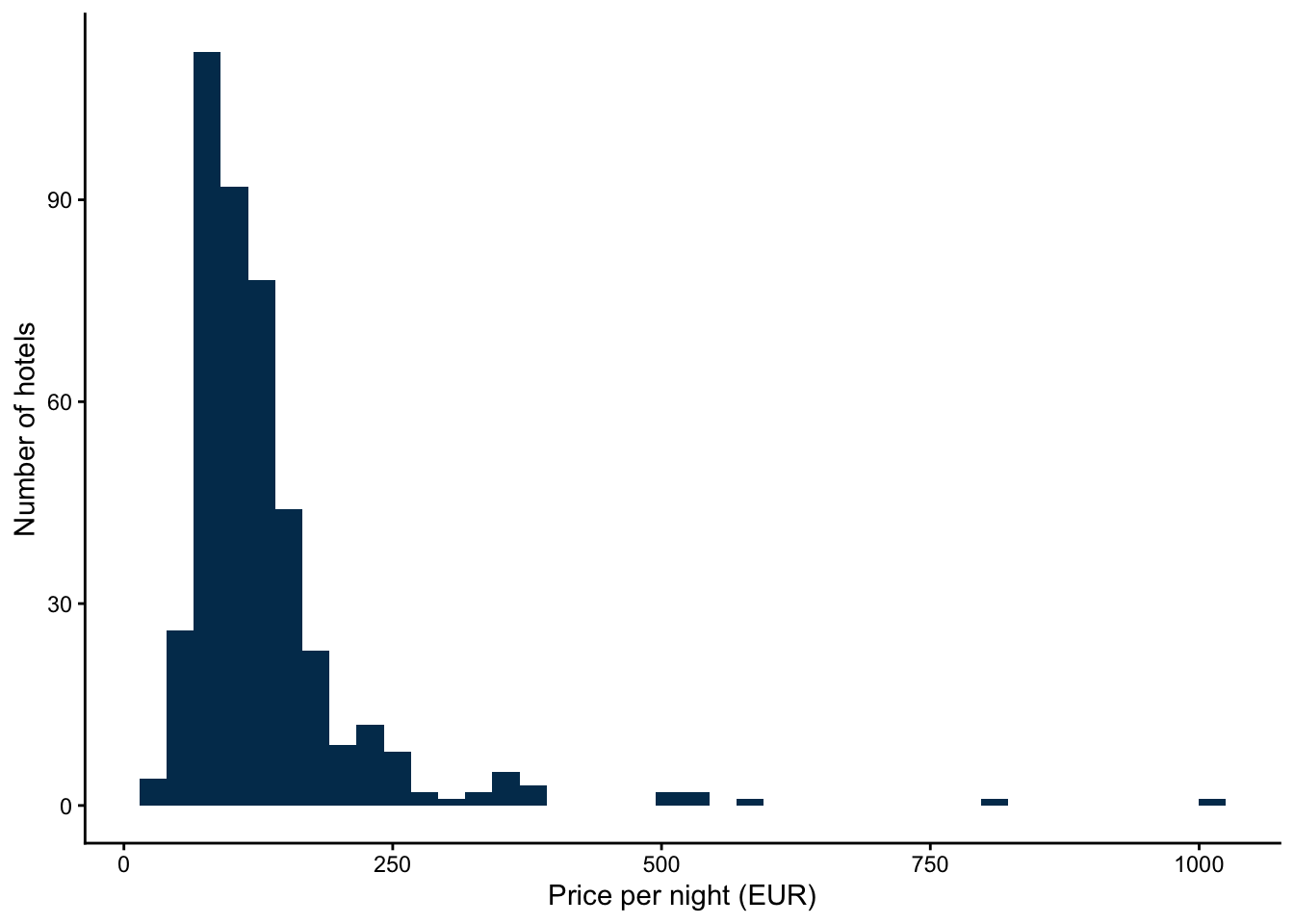
Almost every hotel sits on the left. A handful stretch the axis out to €1012, and they squash everybody else into a narrow band — the same reason the scatter earlier looked like a dense clump with a few strays.
Prices behave like this almost everywhere: a hotel can be ten times the average, but never a tenth of it. The usual fix is to plot price on a logarithmic scale, which spreads the crowded part out and pulls the tail in.
We are not doing it today, deliberately. On a log scale the €1012 hotel stops looking like a mistake and starts looking like an ordinary expensive hotel — and finding that mistake was the whole point of this session. Session 5 picks this up properly by discussing the cases where you must transform your data using logarithms.
You now have all of it:
.qmd file mixing text and code